
Snapchat’s Conversions API lets you send web, app, and offline conversion events to Snap from a server-side source. PostHog can act as that source, so the conversion events you already trust in PostHog can also become Snapchat optimization and measurement signals.
That sounds simple: create the PostHog destination, connect Snapchat, add your Pixel ID, and enable it.
The part that deserves more care is the mapping. Snapchat does not just need "an event." It needs the right event name, timestamp, action source, page context, user matching data, click ID data, and deduplication ID. If you send noisy PostHog events, missing identifiers, or browser and server events that cannot deduplicate, your Snapchat reporting can become inflated, incomplete, or too weak for campaign optimization.
This guide shows you how to send PostHog conversion events to Snapchat Ads using PostHog’s Snapchat Ads Conversions destination, while keeping the setup clean enough for attribution, campaign learning, and conversion optimization.
Quick answer: Create a Snapchat Ads Conversions destination in PostHog, connect your Snapchat Business account and Pixel ID, then map only reliable conversion events with the matching, click-ID, page-context, and deduplication data Snapchat needs. Test the destination before sending live traffic, especially if your browser Pixel also fires.
If you’re looking for PostHog integrations with other advertising platforms, see:
- PostHog <> Google: Event tracking integration
- PostHog <> Pinterest: Event tracking integration
- PostHog <> Meta: Event tracking integration
- PostHog <> Reddit: Event tracking integration
- PostHog <> TikTok: Event tracking integration
If you’d prefer a done-for-you implementation tailored to your business, fill out the Contact Us form and we’ll help design and deploy the appropriate tracking architecture for your setup.
When to Use PostHog for Snapchat Conversion Events
Use this setup when PostHog is already your cleanest source of conversion truth.
Good examples include:
- a lead form submission captured as a reliable PostHog event
- a signup completion event with a stable user ID
- a checkout or plan selection event
- a trial start event
- a purchase, subscription, renewal, or trial conversion event
- a high-intent product event that is intentionally used for ad optimization
Do not send every PostHog event to Snapchat. Autocaptured clicks, pageviews, scroll events, field interactions, and low-intent behavioral events usually make poor ad optimization signals. Snapchat should receive conversion-worthy events that represent meaningful progress in the customer journey.
For CRO and paid acquisition, this matters because ad platforms learn from the feedback you give them. Cleaner events help Snapchat optimize toward real business actions instead of accidental engagement.
How the PostHog to Snapchat Setup Works
PostHog Destinations provide a native way to send that data in real time [Doc]. The TikTok Ads Conversions destination [Doc] is the built-in option for streaming conversion events from PostHog to TikTok without adding unnecessary implementation overhead.
PostHog’s Snapchat Ads Conversions destination sends selected PostHog events to Snapchat’s Conversions API.

At a high level:
- A user performs an action on your site, app, or backend.
- PostHog captures the event and stores event and person properties.
- A PostHog destination filter decides whether that event should be sent to Snapchat.
- PostHog maps the event into Snapchat’s Conversions API format.
- Snapchat receives the event for measurement, optimization, and audience use.
Snapchat’s CAPI v3 request body uses a data array. Each event can include top-level event fields, a user_data object, and a custom_data object.
For web events, the PostHog destination usually sends to:
https://tr.snapchat.com/v3/{PIXEL_ID}/events
You do not normally need to write this request yourself when using PostHog’s destination. You do need to make sure PostHog has the right inputs and filters.
What You Need Before You Start
Before creating the destination, make sure you have:
- access to the relevant PostHog project
- access to the relevant Snapchat Business account
- a Snapchat Pixel ID for web events
- clean PostHog conversion events
- user properties or event properties that can populate Snapchat matching fields
- a decision on whether the Snap Pixel is also firing in the browser
- consent logic that allows this data to be sent to Snapchat
For website events, Snapchat recommends using the same Pixel ID for browser Pixel events and server-side Conversions API events. That keeps the events in the same pipeline and supports deduplication.
Step 1: Confirm the PostHog Events You Actually Want to Send
Start in PostHog, not Snapchat.
Choose the exact events that represent conversion moments. For example:
| Business action | Example PostHog event | Snapchat event name |
|---|---|---|
| Lead submitted | lead_submitted | SIGN_UP or CUSTOM_EVENT_1 |
| Signup completed | sign_up_complete | SIGN_UP |
| Checkout started | checkout_started or plan_select | START_CHECKOUT |
| Trial started | trial_started or rc_trial_started_event | START_TRIAL |
| Purchase completed | purchase_completed or rc_initial_purchase_event | PURCHASE |
Use Snapchat’s standard event names where possible. They are easier to understand in Ads Manager and usually fit optimization workflows better than a long list of custom names.
Before mapping an event, verify it in PostHog:
- it fires once per real conversion
- it fires at the right business moment
- it is not triggered by internal testing or preview traffic
- it has a stable unique ID, such as an order ID, lead ID, transaction ID, or generated event ID
- it has useful person or event properties for matching
- purchase events have value and currency when you want revenue optimization
Step 2: Capture Snapchat Click ID and Browser Context
When someone clicks or swipes up on a Snapchat ad, Snapchat can append a click ID to the destination URL using the ScCid query parameter. This click ID can be sent to Snapchat as sc_click_id, or Snapchat can extract it from event_source_url if the full URL is present.
In PostHog, preserve this value as early as possible. Common property names include:
sccid$initial_sccidScCid
Also preserve browser context for later server-side events:
$ip$raw_user_agent$current_url$referrer
This is especially important when your final conversion happens later in a backend system, billing provider, subscription system, or mobile app. The purchase event may not naturally carry the original browser IP, user agent, URL, or click ID unless you stored those values earlier.
Step 3: Create the Snapchat Ads Conversions Destination in PostHog
In PostHog:
- Open
Data pipeline. - Go to
Destinations. - Search for
Snapchat Ads Conversions. - Click
+ Create. - Connect the Snapchat Business account.
- Add your Snapchat Pixel ID.
- Configure user data.
- Add event and property filters.
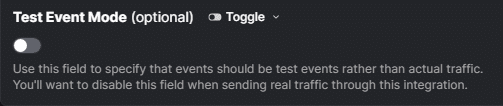
- Enable test mode first.
- Create and test the destination.
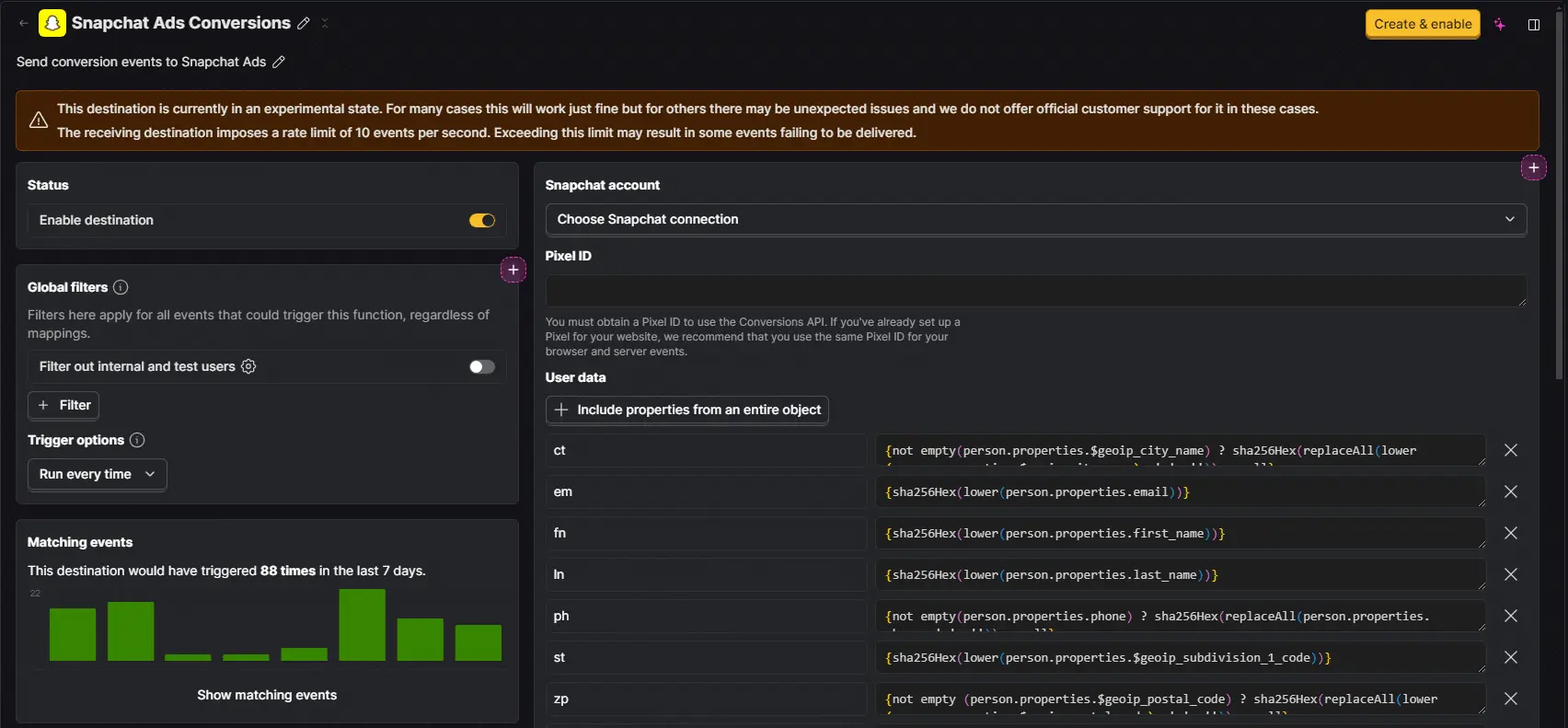
PostHog’s Snapchat destination requires:
| PostHog setting | What it does |
|---|---|
Snapchat account | Connects the Snapchat account used to send events. |
Pixel ID | Routes web events to the correct Snapchat Pixel. |
User data | Maps customer and browser identifiers for Snapchat matching. |
Test Event Mode | Sends test events while validating the setup. Disable it before live traffic. |
Step 4: Map User Data for Snapchat Matching
Snapchat requires user_data with at least one usable matching signal. For web events, that can be:
- hashed email,
em - hashed phone,
ph - client IP address and client user agent together
For app events, Mobile Advertising ID can also be used, but this guide focuses on the common web destination flow through a Pixel ID.
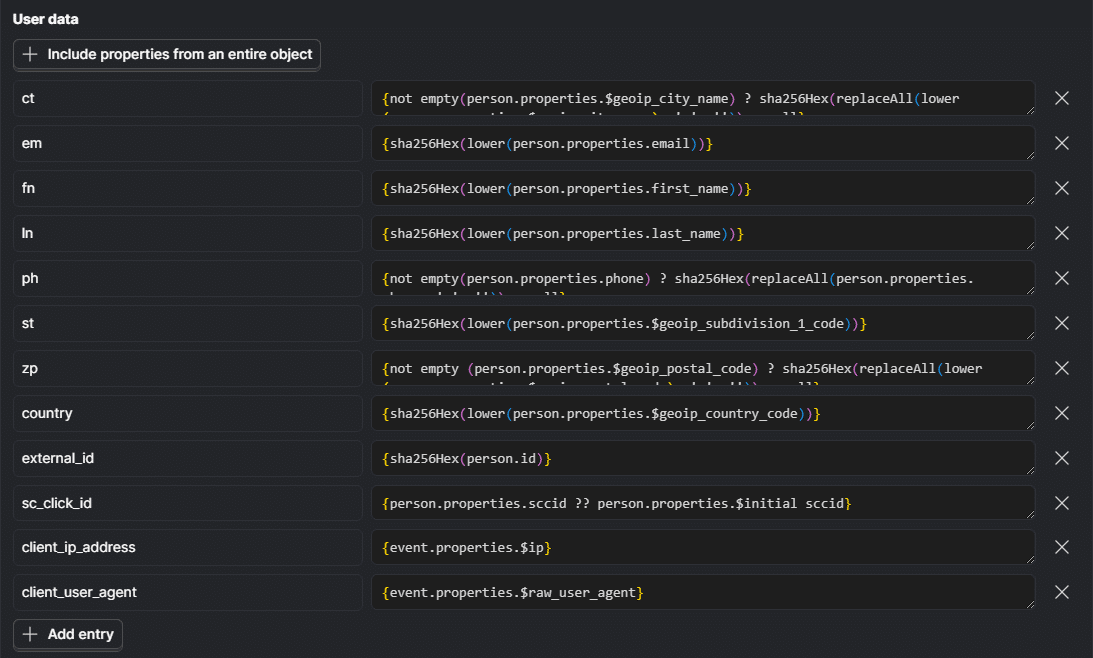
PostHog’s documented destination example maps fields like this:
| Snapchat field | Suggested PostHog source | Notes |
|---|---|---|
em | person.properties.email | Lowercase and SHA-256 hash. |
ph | person.properties.phone | Normalize phone first, then SHA-256 hash. |
fn | person.properties.first_name | Lowercase and SHA-256 hash. |
ln | person.properties.last_name | Lowercase and SHA-256 hash. |
ct | person.properties.$geoip_city_name | Lowercase, remove spaces, hash. |
st | person.properties.$geoip_subdivision_1_code | Lowercase and hash. |
zp | person.properties.$geoip_postal_code | Lowercase, remove spaces, hash. |
country | person.properties.$geoip_country_code | Lowercase and hash. |
external_id | person.id or your app user ID | Hash before sending. |
sc_click_id | person.properties.sccid or $initial_sccid | Send raw click ID. |
client_ip_address | event.properties.$ip | Send raw IP address. |
client_user_agent | event.properties.$raw_user_agent | Send raw user agent. |
Snapchat’s best practices are strict on data hygiene: normalize identifiers before hashing, then hash using lowercase hex SHA-256.
Do not hash IP address or user agent. Do hash email, phone, name, location, and external IDs where Snapchat expects hashed identifiers.
Step 5: Map the Snapchat Event Fields
Each Snapchat conversion event should include the fields Snapchat expects for signal quality:
| Snapchat field | What to send |
|---|---|
event_name | A supported Snapchat event name, such as SIGN_UP, START_CHECKOUT, START_TRIAL, or PURCHASE. |
event_time | Unix timestamp in seconds for when the conversion happened. |
action_source | Usually WEB for website events. |
event_source_url | The page URL where the event happened, when available. |
event_id | Stable unique ID for deduplication. |
user_data | Matching fields such as email, phone, IP plus user agent, click ID, and external ID. |
custom_data | Value, currency, order ID, content IDs, item details, and other business context. |
For PURCHASE events, include:
currencyvalueorder_idinsidecustom_data
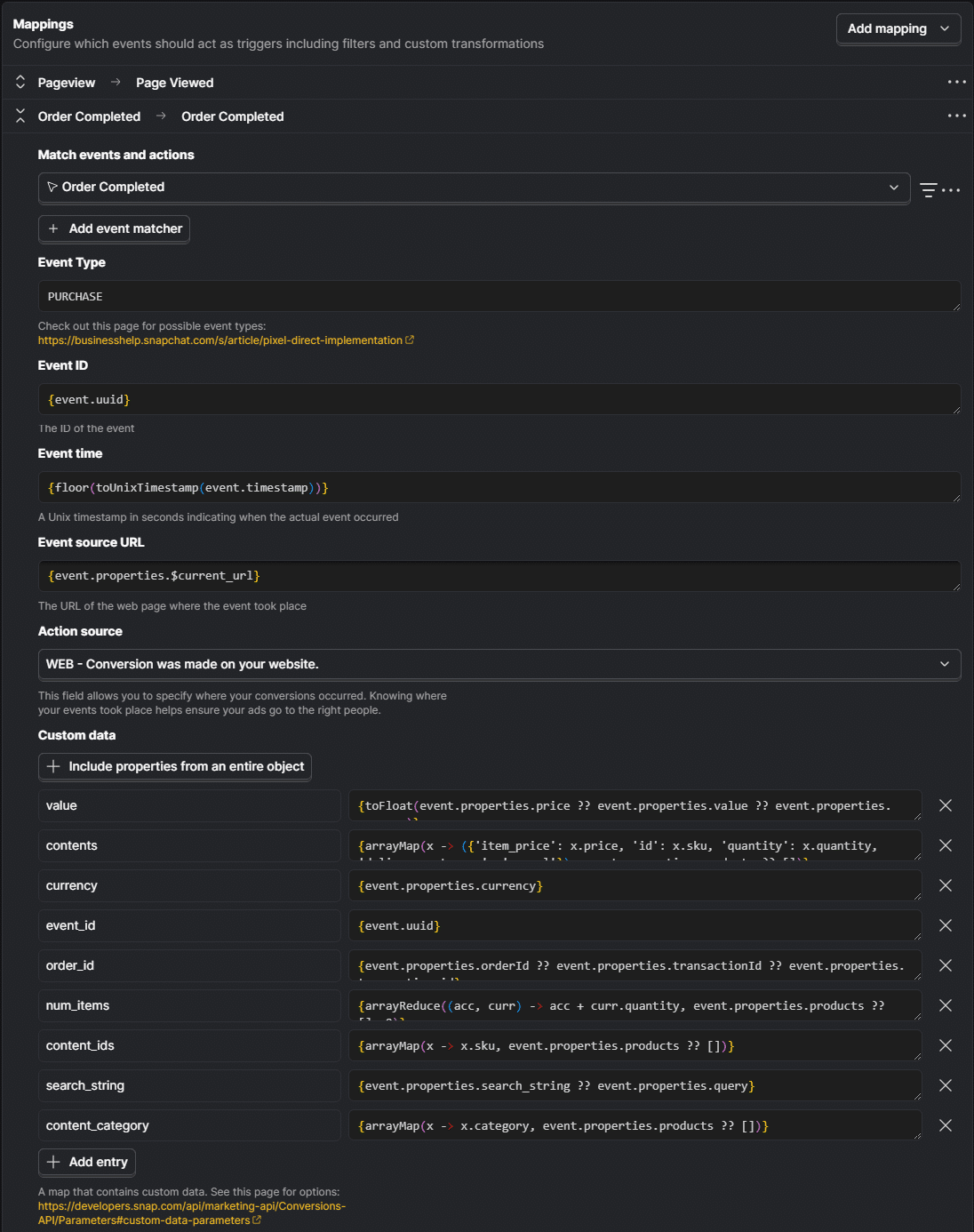
For non-purchase events, still send a stable event_id. This helps if you are also firing the Snap Pixel in the browser and need server/browser deduplication.
Step 6: Add Filters So Only Real Conversions Are Sent
The destination should not be enabled against all events.
Create one mapping or filter set per conversion action. For each mapping, filter by the exact PostHog event and any required properties.
Examples:
| Snapchat conversion | PostHog filter |
|---|---|
| Signup | event = sign_up_complete and person.email is set or client_ip_address + client_user_agent are set |
| Checkout | event = plan_select and product_id is set |
| Trial start | event = rc_trial_started_event and transaction_id is set |
| Purchase | event = rc_initial_purchase_event and revenue > 0 and transaction_id is set |
Also exclude:
- internal team email domains
- agency users
- localhost URLs
- staging domains
- QA events
- preview traffic
- events missing all Snapchat matching fields
- events missing value or currency when the Snapchat event is
PURCHASE
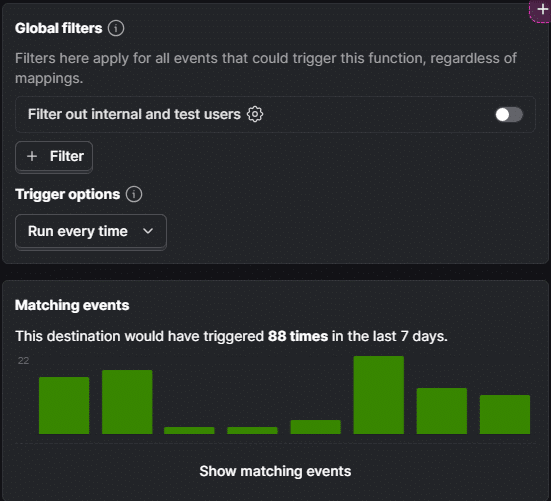
This is the difference between "the destination is on" and "the destination is useful." Snapchat’s optimization quality depends on the signal quality you send.
Step 7: Set Up Deduplication if the Snap Pixel Is Also Running
Many sites run both the Snap Pixel in the browser and Conversions API on the server. Snapchat supports receiving redundant data, but you should send deduplication signals so the same conversion is not counted twice.
For web events, the important pair is:
| Browser Snap Pixel | Snapchat CAPI |
|---|---|
client_dedup_id | event_id |
These values must match exactly for the same event, same Pixel ID, and same event name.
For purchases, Snapchat also recommends using the order or transaction reference:
| Browser Snap Pixel | Snapchat CAPI v3 |
|---|---|
transaction_id | order_id inside custom_data |
Practical rule: generate or reuse one stable conversion ID at the moment of conversion, then pass the same value to the browser Pixel event and the PostHog-to-Snapchat CAPI event.
Good deduplication IDs:
- order ID
- transaction ID
- lead ID
- checkout ID
- generated UUIDv4 created at conversion time
Bad deduplication IDs:
- session ID reused across many actions
- user ID reused across many purchases
- placeholder strings like
{{order_id}} null,undefined,NA- a new random ID generated separately on the server
Snapchat’s standard cross-channel deduplication window is 48 hours. For PURCHASE, the transaction_id to order_id pair can provide a longer purchase-specific safety net.
Step 8: Handle Timestamps Carefully
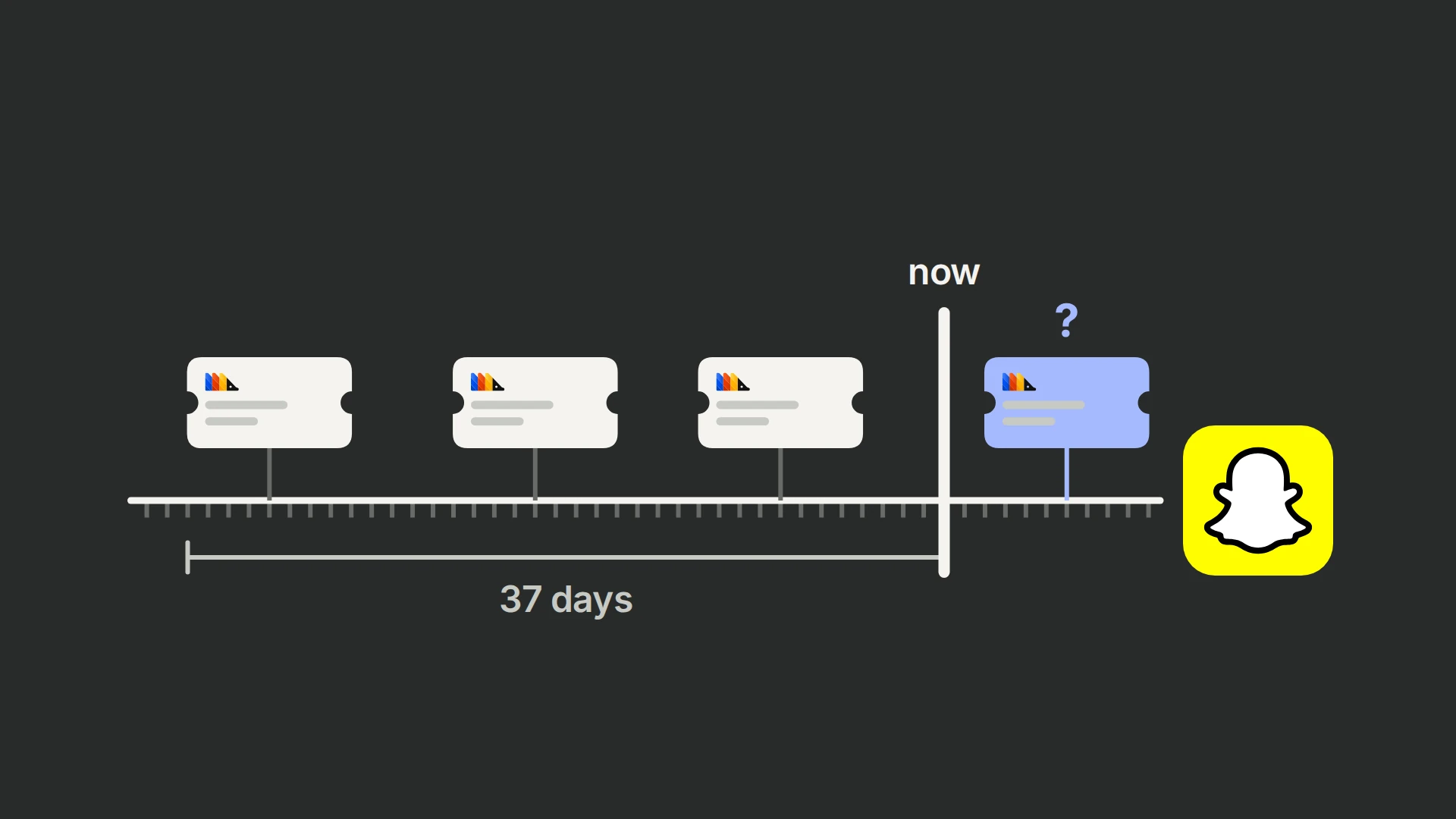
Snapchat expects accurate event timestamps. Snapchat also notes that events can be reported through CAPI with timestamps up to 37 days in the past.
Most web events can use the original PostHog event timestamp.
Be more careful with backend, subscription, and billing events. Some systems send lifecycle events with timestamps that refer to purchase time, renewal time, entitlement time, or provider processing time. If a server-side event arrives late, is replayed, or carries a future timestamp, Snapchat can reject it or treat it poorly.
For subscription funnels, use a timestamp strategy per event type:
| Event type | Timestamp recommendation |
|---|---|
| Web signup or checkout | Original PostHog event time is usually fine. |
| Trial started from billing provider | Use event time only if it is not future-dated. |
| Purchase or renewal from billing provider | Use event time with a future-time guard, or send current processing time if the provider timestamp is unreliable for ad delivery. |
| Backfilled historical events | Avoid sending unless you have confirmed Snapchat accepts the age and deduplication behavior. |
If your PostHog destination code is customized, a useful guard is: if the mapped outbound event_time is in the future, cap it at the current send time.
Step 9: Test Before Sending Live Traffic
Turn on Test Event Mode in the PostHog Snapchat destination before sending real traffic.
Then run through one conversion path at a time:
- Trigger a test signup, checkout, trial, or purchase.
- Confirm the source event appears in PostHog.
- Confirm the destination filter picked it up.
- Check PostHog destination metrics or logs for success or error responses.
- Validate the event in Snapchat using Events Manager, diagnostics, or Snap’s request validation tools.
- Confirm the event has the expected event name, timestamp, Pixel ID, user data, event ID, value, and currency.
- Disable test mode only after the test event is accepted.
Success looks like:
- the event is sent only once from PostHog
- Snapchat accepts the payload
- matching fields are present
- purchase value and currency are present when required
- browser and server events deduplicate when both are running
- no internal or staging events are sent
Common Mistakes to Avoid
Sending Too Many Events
Do not send every PostHog event to Snapchat. Send conversion events that Snapchat should actually optimize toward.
Missing User Data
Snapchat needs match data. At minimum, send hashed email, hashed phone, or IP address plus user agent for web events. Add sc_click_id and external_id when available.
Hashing Before Normalizing
Normalize first, hash second. Lowercase emails, clean phone numbers, and remove spaces where required before SHA-256 hashing.
Losing the Snapchat Click ID
If ScCid is present on landing but not stored on the person or later event, later server-side conversions may lose a strong attribution signal.
Reusing One Event ID Across Many Events
Each conversion needs a unique event ID. Do not reuse the same user ID or session ID across several different conversions.
Letting Browser and Server IDs Drift Apart
If Snap Pixel sends client_dedup_id = abc123 and CAPI sends event_id = xyz789, Snapchat cannot deduplicate them as the same conversion.
Forgetting Value and Currency for Purchases
For PURCHASE, send value and currency. If you also have an order or transaction ID, send it as order_id inside custom_data.
Sending Staging or Internal Traffic
Filter staging domains, local development URLs, team emails, agency emails, and QA users before enabling live traffic.
Ignoring Destination Logs After Launch
PostHog destinations can fail because of missing fields, expired access, bad filters, timestamp issues, or schema changes. Recheck logs after launch and after any tracking change.
Why This Matters for CRO and Paid Acquisition
PostHog is useful because it can hold the actual behavioral journey: landing page, signup, checkout, trial, purchase, subscription, and retention events.
Snapchat Ads is useful because it can optimize delivery using conversion feedback.
The value of this integration is connecting those two systems without polluting either one.
When the setup is clean, you can:
- optimize Snapchat campaigns toward higher-quality conversions
- improve attribution coverage beyond browser-only pixel tracking
- keep browser and server events deduplicated
- use PostHog’s event quality as the gate before data reaches Snapchat
- send purchase value for revenue-aware optimization
- protect experiment and funnel analysis from ad-platform tracking shortcuts
This is why the right setup is not "send PostHog to Snapchat." It is "send the right PostHog events, with the right identifiers, to the right Snapchat conversion events."
Frequently asked questions
Can PostHog send events directly to Snapchat Ads?
Do I need a Snapchat Pixel ID?
Should I send all PostHog events to Snapchat?
What user data does Snapchat require?
sc_click_id, sc_cookie1, or external_id when available.Does PostHog hash Snapchat user data automatically?
sha256Hex(lower(person.properties.email)). Check each mapped field and make sure identifiers are normalized before hashing.What is the Snapchat click ID?
ScCid to ad destination URLs. Preserve it in PostHog and send it as sc_click_id, or include the full event source URL when it still contains the click ID.How do I avoid duplicate conversions?
client_dedup_id should match CAPI event_id. For purchases, Pixel transaction_id should match CAPI order_id inside custom_data.What should I send for purchase events?
event_name = PURCHASE, a stable event_id, accurate event_time, value, currency, and order_id inside custom_data. Also include the strongest user matching data available.Can I send subscription or RevenueCat events from PostHog to Snapchat?
How do I test the setup?
Test Event Mode, trigger one conversion, check the event in PostHog, review destination logs, and validate the result in Snapchat Events Manager or Snap’s validation tools. Disable test mode before sending live traffic.