
If you are already using PostHog to track your funnel, you probably have the conversion events Pinterest needs: product views, searches, add-to-cart events, checkout starts, purchases, signups, and leads.
The problem is that those events only help Pinterest optimize campaigns if Pinterest receives them in the right format, with the right event names, user identifiers, order values, product data, and source context.
In this guide, I will show you how to send PostHog conversion events to Pinterest using PostHog’s Pinterest Conversions API destination. The goal is not just to switch on another integration. The goal is to send cleaner server-side conversion signals so Pinterest has better data for reporting, attribution, retargeting, and campaign optimization.
Quick answer
Start with one high-value event—usually a purchase or lead—and send it through PostHog’s Pinterest Conversions API destination. Map the relevant event, user, value, product, and source data to Pinterest’s expected fields, and follow your consent policy; if Pinterest Tag also sends the conversion, share a stable event_id so the browser and server events can be deduplicated. Verify one test in PostHog and Pinterest before expanding to more events.
If you’re looking for PostHog integrations with other advertising platforms, see:
- PostHog <> Google: Event tracking integration
- PostHog <> Meta: Event tracking integration
- PostHog <> TikTok: Event tracking integration
- PostHog <> Reddit: Event tracking integration
- PostHog <> Snapchat: Event tracking integration
If you want a custom implementation without the technical work, fill out the Contact Us form and we’ll help architect and deploy a tracking solution tailored to your business needs.
What We Are Setting Up
PostHog Destinations provide a native way to send that data in real time [Doc]. The Pinterest Ads Conversions destination [Doc] is the built-in option for streaming conversion events from PostHog to TikTok without adding unnecessary implementation overhead.

That means you can take an event you already trust in PostHog, such as Order Completed, Subscription Started, Lead Submitted, or Product Added To Cart, and map it to a Pinterest conversion event such as:
checkoutadd_to_cartleadsignupsearchpage_visitview_categoryview_content
Pinterest can receive web, app, and offline conversions through the API. PostHog sends mappings as web conversions by default. If you are sending mobile app or delayed offline events, you need to change the mapping’s Action Source to app_android, app_ios, or offline.
The cleanest setup is usually:
- Pinterest Tag on the website for browser-side tracking and first-party browser context.
- PostHog Pinterest Conversions API destination for server-side events enriched with PostHog properties.
- A stable
event_idshared between browser and server versions of the same conversion if you run both, so Pinterest can deduplicate matching events.
PostHog’s Pinterest destination notes say the API can be used without the Pinterest tag, but using the API alongside the tag gives a more complete view of campaign performance.
Official references:
What You Need Before You Start
Before touching mappings, make sure you have these ready:
- A Pinterest business or advertiser account.
- Your Pinterest Ad Account ID.
- Your Pinterest Conversion Token.
- Access to PostHog Data pipelines.
- The PostHog source that contains your conversion events.
- A list of PostHog event names you want to send to Pinterest.
- A clear consent policy for advertising and conversion tracking.
- If you also use Pinterest Tag, a stable
event_idstrategy for deduplication.
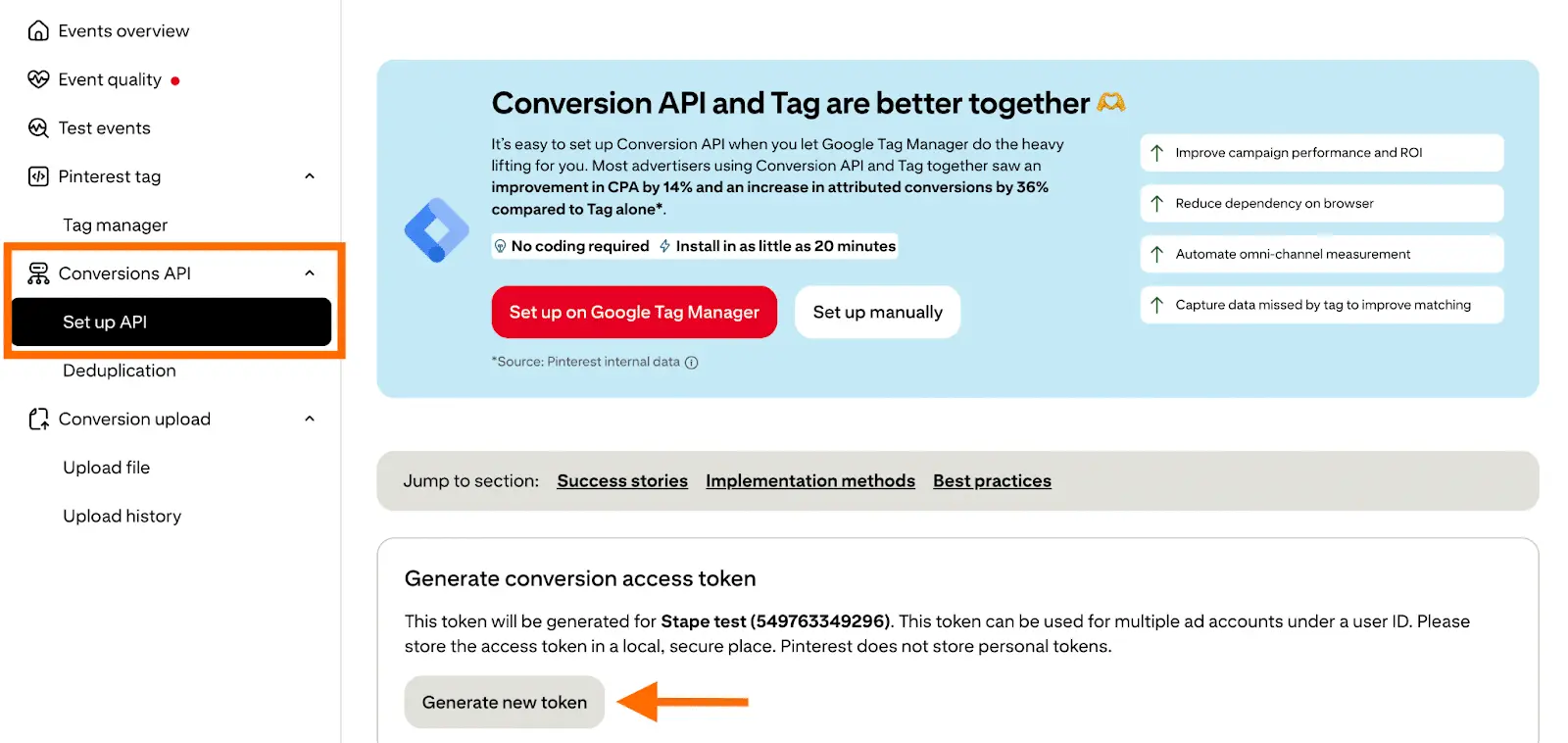
You can find the Pinterest Ad Account ID and Conversion Token from Pinterest’s Ads Manager / Conversions API setup flow. In PostHog, these two values go into the destination’s Basic Settings.
Step 1: Choose the PostHog Events Worth Sending
Do not send everything.
Pinterest optimization works better when you send meaningful conversion signals, not every low-intent interaction your product analytics stack captures. Start with events that represent real funnel progress. See our event tracking plan guide for a broader framework.
For ecommerce, the usual events are:
| PostHog event | Pinterest event |
|---|---|
Product Viewed | view_content or page_visit |
Product Searched | search |
Product Added To Cart | add_to_cart |
Checkout Started | initiate_checkout |
Order Completed | checkout |
Newsletter Signup | signup or lead |
Lead Submitted | lead |
For SaaS or lead generation funnels:
| PostHog event | Pinterest event |
|---|---|
Signup Completed | signup |
Trial Started | custom event or signup depending on your campaign goal |
Demo Requested | lead |
Application Submitted | custom event or lead |
Subscription Started | subscribe or checkout |
Pinterest supports standard event names and custom event types. Use standard events wherever possible because they are easier to use for campaign optimization and reporting. Use custom events only when the action does not fit a standard Pinterest event.
Important: Pinterest’s browser tag examples use names like AddToCart and Checkout, while the Conversions API uses snake_case values like add_to_cart and checkout. In PostHog’s Pinterest Conversions API destination, follow the destination mapping fields and use the API-style event values when configuring server-side events.
Step 2: Prepare the Properties Pinterest Needs
Pinterest cares about two layers of data:
- Event data: what happened, where it happened, when it happened, and what it was worth.
- User data: who likely performed the action, sent in privacy-safe matching fields.
For server-side conversion events, prioritize these event fields:
| Pinterest field | Why it matters | Example PostHog value |
|---|---|---|
event_name | Tells Pinterest the conversion type | checkout |
event_time | Tells Pinterest when the event happened | event timestamp |
event_id | Unique event identifier, also used for deduplication | order ID, transaction ID, booking ID |
event_source_url | Full URL where the conversion happened | event.properties.$current_url |
action_source | Where the conversion happened | web |
value | Revenue or conversion value | event.properties.total |
currency | Currency for value | event.properties.currency |
order_quantity | Quantity of items/orders | event.properties.quantity or item count |
order_id | Order identifier | event.properties.order_id |
line_items | Product-level details | product array from checkout |
For user matching, prioritize:
| Pinterest field | Format to send |
|---|---|
em | SHA-256 hash of lowercase email |
ph | SHA-256 hash of phone digits with country code |
external_id | SHA-256 hash of your user/customer ID |
client_ip_address | User’s real IPv4 or IPv6 address |
client_user_agent | Real browser user agent |
click_id | _epik cookie value when available |
country, ct, st, zp | Hashed location fields in Pinterest’s expected format |
The highest leverage fields are usually email, external ID, IP address, user agent, event source URL, click ID, value, currency, order ID, product IDs, and event ID.
If you are missing IP address in PostHog person properties, check whether it exists on events as $ip. If you need it repeatedly in destinations, it can be copied to person properties with a PostHog transformation. We covered that pattern in our guide on saving IP address to PostHog person properties.
Step 3: Connect Pinterest Conversions API in PostHog
In PostHog:
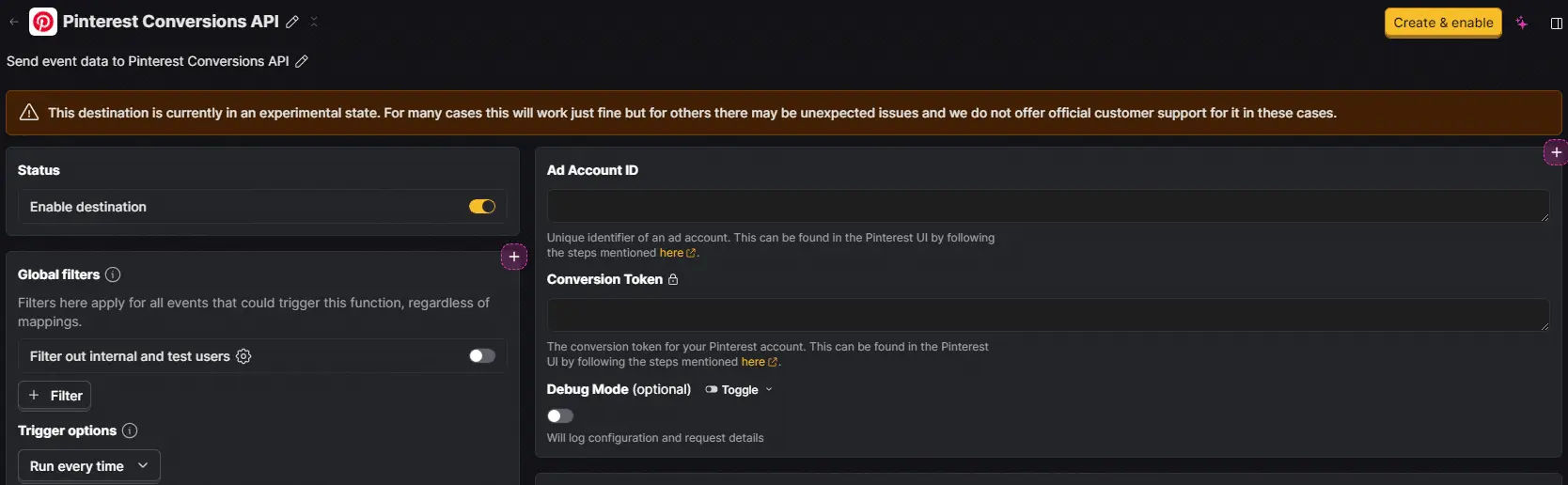
- Go to
Data pipelines. - Open
Destinations. - Search for
Pinterest Conversions API. - Select the destination.
- Click
Configure Pinterest Conversions API. - Select the source that contains the conversion events.
- Name the destination clearly, for example
Pinterest CAPI - Web Conversions. - Enter the
Ad Account ID. - Enter the
Conversion Token. - Leave Debug Mode off for production, but consider turning it on while testing.
- Save the basic settings.
PostHog’s documentation also shows an API-based setup using the segment-actions-pinterest-conversions-api template ID, but for most teams the UI setup is easier and safer because you can inspect mappings before events go live.
Step 4: Configure Your First Mapping
Start with one high-value event, usually purchase or lead. Do not configure every event at once. One tested mapping is better than six half-tested mappings.
In the Pinterest destination:
- Open the
Mappingstab. - Review the prebuilt mappings such as
Checkout,Search, andAdd to Cart. - If a prebuilt mapping fits, open it and adjust the field values to your PostHog schema.
- If you need a custom mapping, click
New Mapping. - Select
Report Conversions Event. - Add a filter so the mapping only fires for the intended PostHog event.
- Fill the Pinterest fields.
- Enable the mapping.
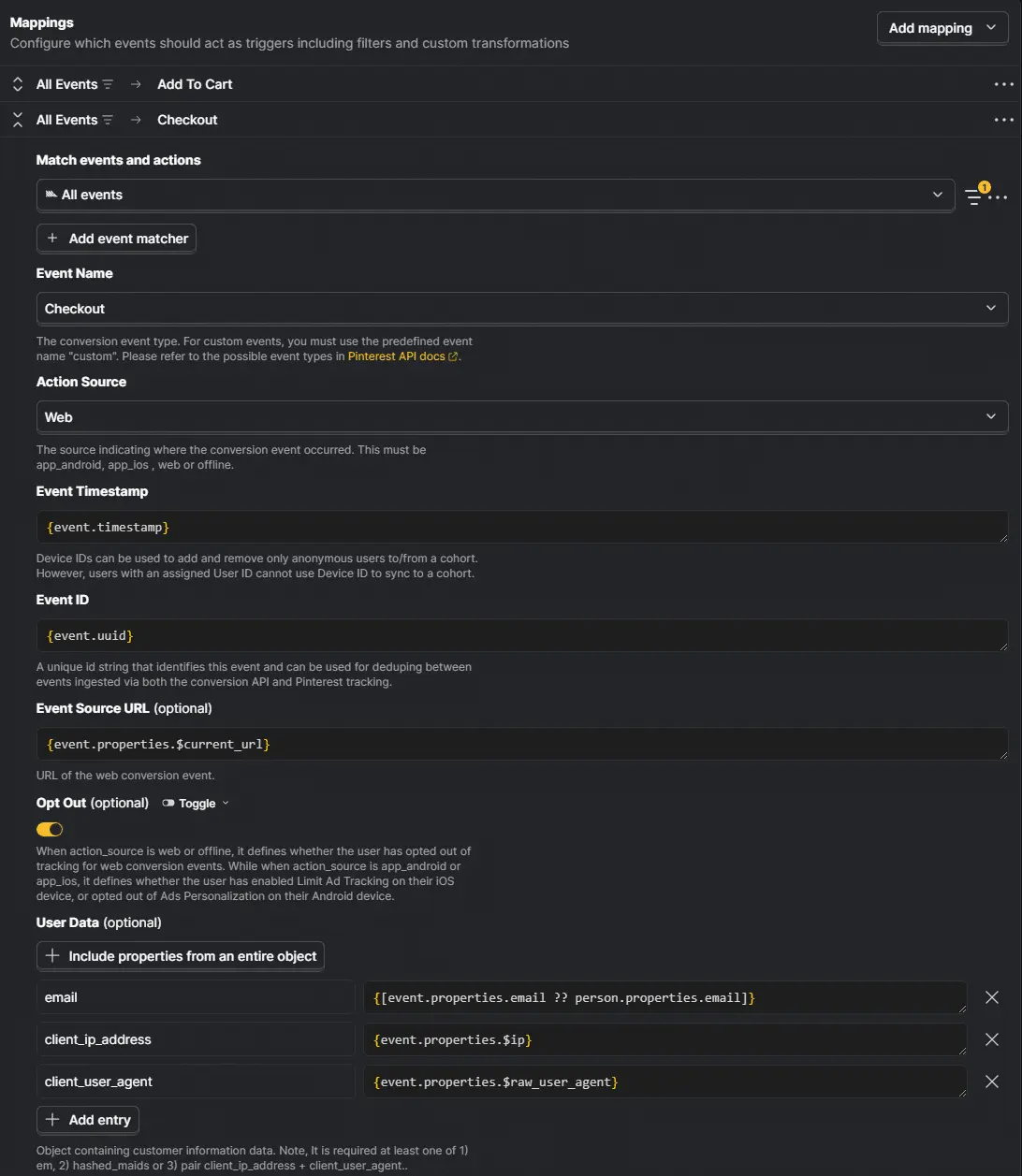
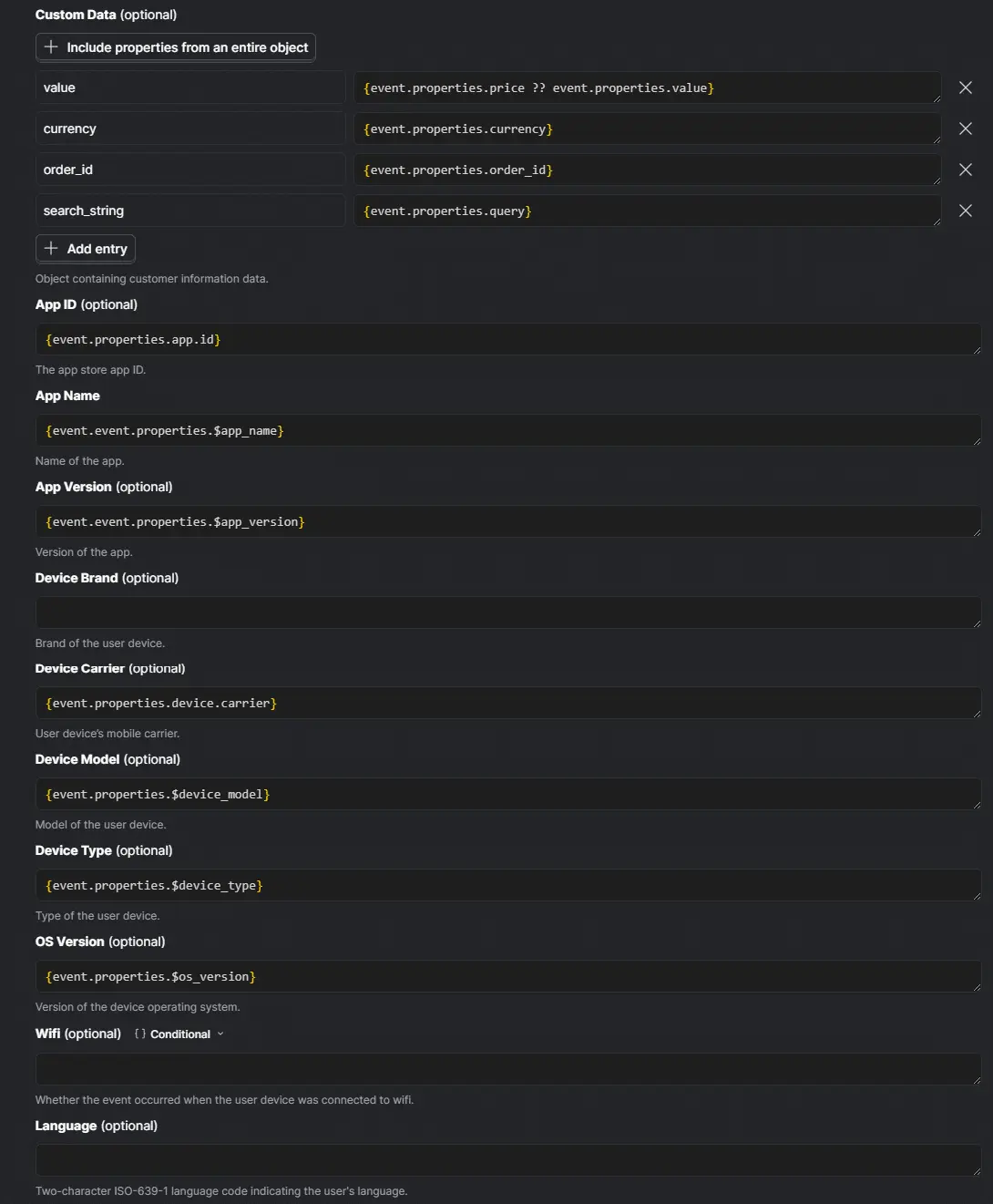
For a purchase event, the mapping usually looks like this:
| Pinterest field | Suggested value |
|---|---|
event_name | checkout |
action_source | web |
event_time | event timestamp |
event_id | event.properties.order_id or event.properties.transaction_id |
event_source_url | event.properties.$current_url |
value | event.properties.revenue or event.properties.total |
currency | event.properties.currency |
order_id | event.properties.order_id |
order_quantity | number of purchased items |
line_items | product array, if available |
client_ip_address | event.properties.$ip |
client_user_agent | event.properties.$raw_user_agent |
em | hashed email from person or event properties |
external_id | hashed user/customer ID |
click_id | _epik value, if captured |
The exact PostHog expression depends on your schema. The important rule is to map from the event that represents the real business action, not from a page view that merely suggests the action happened.
For example, a checkout success page view is not as trustworthy as an Order Completed event that fires after payment is confirmed.
Step 5: Use Stable Event IDs for Deduplication
If you send the same conversion through both Pinterest Tag and PostHog’s server-side destination, you need a shared event identifier.
Pinterest’s Conversions API documentation describes event_id as a unique event identifier used for deduplicating events sent through the API and Pinterest tracking. In practical terms, the browser event and the server event need to describe the same conversion with the same event name and the same event ID.
Good event IDs:
- Order ID for purchases.
- Transaction ID from your payment provider.
- Booking ID for appointments.
- Lead ID for lead submissions.
- Subscription ID for subscription starts.
Weak event IDs:
- A random value generated separately in browser and server contexts.
- A timestamp by itself.
- A user ID by itself.
- A session ID by itself.
For purchase events, use the order or transaction ID. For leads, generate one lead ID when the lead is created and use that same ID everywhere.
If your Pinterest Tag currently fires a checkout event on the confirmation page, update the tag event data to include the same event_id that PostHog sends through the destination. Otherwise Pinterest may see two similar conversion events and fail to deduplicate them cleanly.
Step 6: Map Product and Order Data Correctly
For ecommerce, do not stop at event name and value.
Pinterest’s tag documentation shows event data such as value, order_quantity, currency, order_id, and line_items. For product-level context, line_items can include fields like:
product_nameproduct_idproduct_categoryproduct_variant_idproduct_variantproduct_priceproduct_quantityproduct_brand
For catalog sales campaigns, Pinterest expects richer product context. At minimum, make sure product_id aligns with the IDs Pinterest knows from your catalog. If your store sends internal database IDs to PostHog but Pinterest’s catalog uses SKUs, map the SKU instead.
A clean purchase payload should answer:
- What event happened?
- What was the order worth?
- What currency was used?
- Which order was it?
- Which products were bought?
- Which user likely performed the action?
- Which page or click context led to it?
That is the difference between "a purchase happened" and "this specific Pinterest campaign drove a purchase for products Pinterest can understand."
Step 7: Capture the Pinterest Click ID
Pinterest uses the epik click identifier to help connect conversions back to Pinterest ad clicks.
Pinterest’s API documentation recommends using the _epik cookie value for click_id when available, because URL parameters can disappear during redirects, checkout flows, and cross-domain navigation.
In practice:
- Preserve the
epikURL parameter on landing. - Store it in a first-party cookie or PostHog person property if your consent policy allows it.
- Send the stored value as
click_idin the Pinterest destination mapping.
If you only rely on event_source_url, you may lose the click ID when the user converts later, especially after checkout redirects or multi-step funnels.
Step 8: Turn On the Destination Carefully
Once your first mapping is configured:
- Keep the destination disabled.
- Trigger one test event in a staging or controlled production path.
- Check the event in PostHog.
- Confirm all required properties exist on the PostHog event.
- Enable the mapping.
- Turn on Debug Mode temporarily if you need request details.
- Enable the destination.
- Trigger the same event again.
- Check Pinterest Events / Conversions reporting.
PostHog says events received by Pinterest within an hour are reported as web or app events. Events received later, including delayed batch events, can be categorized as offline conversions. That timing matters if you are using delayed ingestion, warehouse replay, or batch backfills.
For live ad optimization, send events as close to real time as possible.
How to Verify the Setup
Verification should happen in both PostHog and Pinterest. For a broader validation framework, see our conversion tracking audit and PostHog Audit: 12 Checks Before You Trust the Data.
In PostHog, check:
- The source event exists.
- The mapping filter matches only the intended event.
- The mapped properties are not empty.
- Debug Mode shows the expected request details if enabled.
- The destination is enabled.
- Failed delivery logs do not show authentication or validation errors.
In Pinterest, check:
- The conversion source receives events.
- The event name appears as expected.
- Recent events show in event history or testing tools.
- Event ID coverage is healthy if you use both tag and API.
- Deduplication diagnostics do not show missing or inconsistent IDs.
- Purchase events include value and currency.
- Product events include product IDs that match the catalog.
Success looks like this: a test purchase appears once in Pinterest, with the right event name, timestamp, value, currency, order ID, user data coverage, and product data.
Common Mistakes to Avoid
Sending the wrong event name
PostHog event names are your internal taxonomy. Pinterest event names are Pinterest’s taxonomy. Map them intentionally.
Order Completed should become checkout, not a custom Pinterest event called Order Completed, unless you have a specific reason to keep it custom.
Sending too many events
Pinterest does not need every click, scroll, or PostHog autocapture event. Send conversion and intent signals that match your campaign goals.
Missing event_id
If you run Pinterest Tag and Conversions API together, missing or unstable event_id is the fastest way to create duplicate reporting.
Using random IDs for the same conversion
A browser-generated random ID and a server-generated random ID are not the same ID. Use an order ID, transaction ID, or lead ID that exists in both places.
Forgetting currency
Pinterest supports specific currency codes such as USD, GBP, CAD, EUR, AUD, and NZD in its tag event data. Make sure the currency you send matches the order value and your Pinterest account expectations.
Sending backend IP or user agent
For web conversions, client_ip_address and client_user_agent should describe the user, not your server, payment processor, or backend integration.
Losing the Pinterest click ID
If epik is not captured on landing, you may not have it by the time the conversion happens. Preserve it early if your consent policy allows advertising attribution storage.
Mapping product IDs that do not match the catalog
For ecommerce, product ID consistency matters. If Pinterest’s catalog uses SKUs, do not send a different internal product ID unless you have mapped it intentionally.
Testing with ad blockers or internal filters
Ad blockers, privacy extensions, internal traffic filters, and staging domains can hide whether the production setup works. Test in a controlled but realistic path.
Leaving Debug Mode on forever
Debug Mode is useful while testing, but do not leave unnecessary logging enabled in production unless you have a reason.
Why This Matters for Attribution and CRO
This setup is not just a tracking exercise.
Pinterest campaigns optimize based on the signals they receive. If your conversion events are late, duplicated, missing value, missing user context, or mapped to the wrong event names, Pinterest’s reporting becomes less useful and campaign optimization becomes weaker.
PostHog is useful here because it already sits close to your product and funnel truth. You can decide which events are meaningful, enrich them with person and event properties, and send only the signals that match real business outcomes.
That matters for CRO too. When ad platforms optimize toward clean conversion events, you get a cleaner feedback loop:
- Better campaign attribution.
- Better campaign optimization.
- Better retargeting audiences.
- Better experiment interpretation.
- Less confusion between analytics, ad reporting, and revenue data.
The technical work is small compared to the cost of optimizing campaigns on noisy or duplicated conversion data.
Publishing Checklist
Before publishing the setup or rolling it out across all events, confirm:
- Pinterest Ad Account ID is correct.
- Conversion Token is correct.
- Destination source is correct.
- Each mapping has a narrow event filter.
- Event names use Pinterest’s expected taxonomy.
action_sourceis correct for web, app, or offline events.event_idis stable and shared with Pinterest Tag when needed.event_source_urlincludes the conversion page URL.valueandcurrencyare present for revenue events.- Product IDs match Pinterest catalog IDs.
- Email, phone, and external ID are formatted and hashed correctly where required.
- IP address and user agent describe the user.
_epikor click ID is captured where available and allowed.- Consent rules are respected.
- One live test conversion appears correctly in Pinterest.
Final Word
Sending PostHog conversion events to Pinterest is a strong setup when PostHog already holds your cleanest funnel events.
Start with one event that matters, usually checkout or lead. Map it carefully, verify it in both tools, and only then expand to supporting events like add_to_cart, search, signup, and view_content.
The best version of this setup is boring in the right way: every conversion has a clear trigger, a stable event ID, real user context, correct product or order data, and a validation path you can repeat later.
If you want help implementing this properly, 99Ways can help you build the tracking plan, PostHog destination mappings, Pinterest validation flow, and reporting checks around the actual conversion events that drive your business.
Frequently asked questions
Can PostHog send events directly to Pinterest?
Do I still need the Pinterest Tag?
What is the most important event to send first?
checkout. For lead generation, it is usually lead. For SaaS, it may be signup, subscribe, or a custom event depending on the campaign goal.Which event names should I use for Pinterest?
checkout, add_to_cart, initiate_checkout, lead, signup, search, page_visit, view_category, view_content, and watch_video. Use custom events only when the action does not fit a standard event.What is event_id used for?
event_id uniquely identifies a conversion event. Pinterest also uses it for deduplicating events sent through both Conversions API and Pinterest tracking, so it should be stable and shared across both sources when both fire for the same conversion.What should I use as the event ID?
What user data should I send to Pinterest?
Do I need to hash email addresses?
How do I send product data?
line_items where available. Include product ID, name, category, price, quantity, variant, and brand when your PostHog event contains those fields. For catalog campaigns, make sure product IDs match Pinterest’s catalog IDs.How can I test the setup?
What happens if events arrive late?
Can I send offline conversions from PostHog?
offline instead of the default web. Be careful with timing, identifiers, and consent because offline events behave differently from live web events.