
PostHog added per-pipeline notification settings for data pipeline errors.
This is an alerting-quality update. It gives teams a more precise way to control operational noise without muting the entire category of pipeline errors.
What Changed?
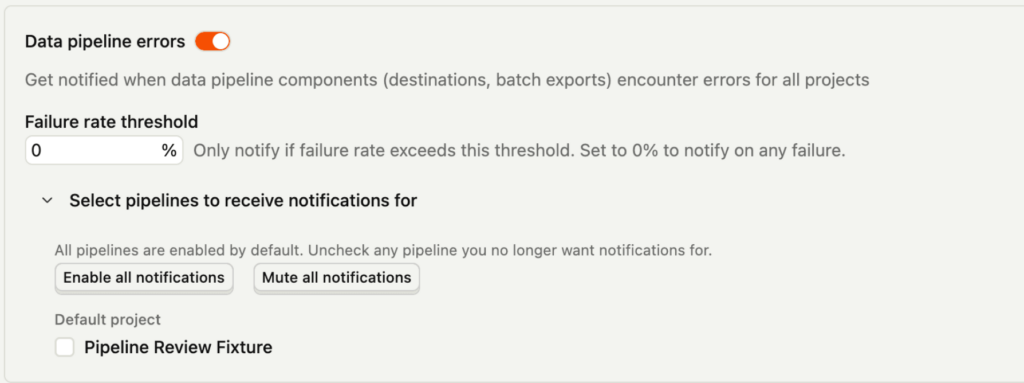
According to the official changelog, you can now specifically mute error notifications for individual pipelines:
- destinations
- transformations
- batch exports
- legacy plugin destinations
The controls live in PostHog notification settings.
Why This Matters
Alert fatigue is a real analytics operations problem.
As a result, if every failing or low-priority pipeline triggers the same level of urgency, teams gradually lose trust in notifications and, over time, start tuning them out. That increases the chance that a high-value production failure gets missed.
Per-pipeline controls help teams separate:
- critical pipelines that should page attention quickly
- noisy pipelines that are known or lower priority
- legacy integrations that still exist but are, nevertheless, not equally important
How to Use It Well
This feature should be used for prioritization, not denial.
Good usage looks like:
- Identify which destinations, transformations, and exports are business-critical.
- Keep notifications on for the flows that materially affect reporting, attribution, or operations.
- Mute only the pipelines where alert volume is disproportionate to actual business risk.
- Review muted items periodically so temporary muting does not become permanent blindness.
Where Teams Go Wrong
Ultimately, the biggest risk is muting alerts because they are annoying rather than because they are genuinely low priority.
That creates a false sense of cleanliness. The notifications disappear, but the broken pipeline is still broken.
Other mistakes:
- muting an item without documenting why
- muting a pipeline that still affects paid media, attribution, or revenue data
- treating notification settings as a substitute for fixing unstable destinations
Business Context
This feature matters for companies using multiple PostHog pipelines across CDP, exports, transformations, and destination syncs.
As the pipeline surface area grows, alerting precision becomes part of system reliability. Better notification targeting means better operator attention.
Frequently asked questions
Where are the controls?
In PostHog notification settings.
Why is this useful?
It reduces alert fatigue by letting teams tune notifications per pipeline instead of globally.
Is muting alerts always a good idea?
No. It is only a good idea when the business risk is low enough to justify reduced noise.
Can this help batch export operations too?
Yes. Batch exports are explicitly included in the release note.
Does this fix pipeline failures?
No. It only changes notification behavior.
What is the biggest risk?
Hiding an important broken pipeline because the team optimized for silence instead of monitoring quality.
Who should manage these settings?
Usually the person or team responsible for analytics operations, data pipelines, or PostHog administration.
Should muted pipelines be reviewed later?
Yes. Otherwise temporary exceptions can become permanent blind spots.
Is this an observability feature?
Yes. It improves the quality of operational monitoring around PostHog pipelines.