
Offering a webinar about two minutes after registration, instead of a wait of up to 15 minutes, drew more joins in an eight-day test that intercepted more than 22,000 visitors. A separate waiting-room test favored the 27-second automatic start over a manual redesign or direct entry. Both comparisons favored these versions, but neither establishes a precise, reliable lift. Test one delay at a time, then follow joins through to applications and purchases.
Case 1: automatic start, manual entry or no waiting room
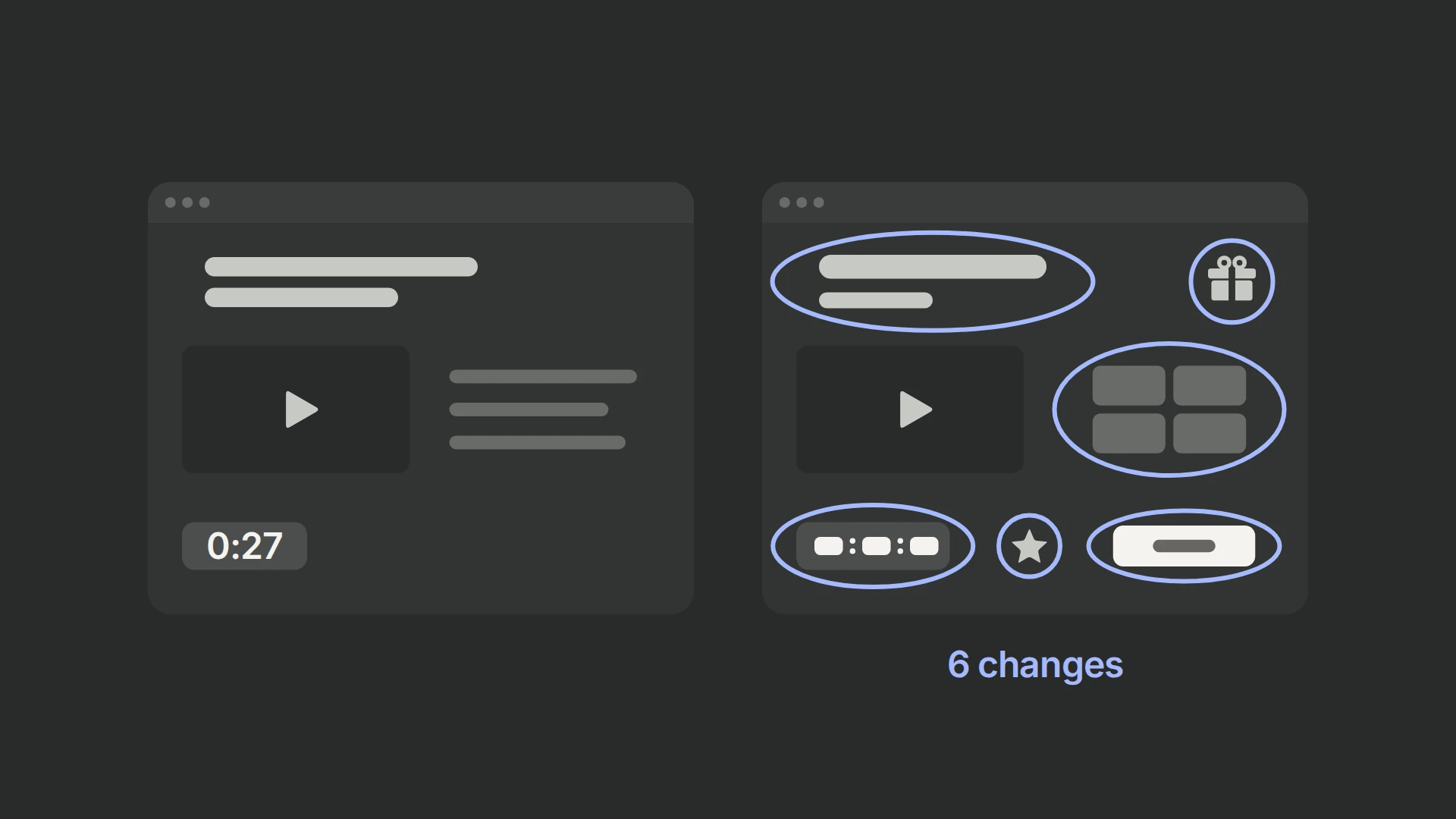
We had tried removing waiting rooms for other clients without success, but wanted to test the idea in this funnel rather than carry that conclusion across businesses. We also tested a manual-entry redesign against the existing automatic start.
| Experience | Entry behavior | Delay | Other changes |
|---|---|---|---|
| Control | Automatic start | 27-second countdown | Default title and subheadline |
| Manual-entry package | Visitor clicks Join Live Room | Described as one minute | Rebuilt layout, new copy, bonuses and accolades |
| No waiting room | Direct entry | None | Waiting-room step removed |
The manual-entry package changed the layout and copy, added bonus and accolades sections, and used a one-minute timer described elsewhere as looping. The saved account does not explain when that timer restarted.
Applications and enrollments favored the default
| Role | Outcome | What it measures |
|---|---|---|
| Primary | Completed application | Whether the viewer submitted the later form |
| Secondary behavior | Application-form visit before automatic redirect | Whether the viewer chose to continue early |
| Business outcome | Enrollment / purchase | Sales reconciled manually with the client’s internal records |
The application button appeared about two minutes before the webinar ended; viewers who used it reached the form before the end-of-webinar redirect. We treated this as early interest, rather than assuming an early click made someone a qualified lead.
The 27-second automatic-start control led both alternatives on all three outcomes, by modest margins. Without arm counts or uncertainty estimates, that is a descriptive loss for the alternatives, not a statistically verified win.
A package result does not identify its cause
Changing several elements together is appropriate when the business question is “Should we ship this complete redesign?” If the package loses, it is not appropriate to conclude that manual entry, a longer countdown, testimonials or copy individually hurt conversion. Those require planned contrasts or later isolated tests.
A focused follow-up would keep the control layout, copy and 27-second delay, then change only automatic entry versus a clearly labelled Join button. Test countdown length and supporting content separately. Record autoplay and redirect failures so a technical problem is not mistaken for reluctance to watch.
Case 2: offer a session about two minutes after registration
This funnel used StealthSeminar sessions scheduled every 15 minutes. A registrant could therefore wait up to 15 minutes before watching. We suspected that people lost focus during that gap, particularly on mobile, and tested offering a start about two minutes after registration instead.
The scheduling integration
We used custom JavaScript and the StealthSeminar API to fetch the next available session and assign its start time to the registration form. On submission, we recorded the registration and start time in PostHog, then followed whether the person entered the webinar. The primary metric was webinar joined.
The test ran for eight days and intercepted more than 22,000 users. Intercepted visitors, completed registrations and people entering the webinar are different populations; an implementation must record each stage rather than treat the traffic total as the join-rate denominator.
| Published comparison | Control | Two-minute schedule | Status |
|---|---|---|---|
| Narrative join-rate claim | — | Nearly 300% higher | Direction favors shorter scheduling; exact lift unresolved |
| Result-image rate pair | 0.70% | 1.01% | +0.31 percentage points; about +44% relative from rounded rates |
The configured funnel also included a later application submission, so the 1.01% / 0.70% pair cannot be assigned confidently to webinar joins or reconciled with “nearly 300%” without the original step definitions and arm counts.
The practical next test is the shorter schedule with explicit join counts and follow-up viewing outcomes. The historical account favors it, but does not establish a universal two-minute rule or show that impatience caused the difference.
Handle the failure paths as part of the test
Handle time zones, unavailable sessions, API latency, duplicate submissions and session-lookup failures explicitly. Set assignment before the scheduling request, record integration failures separately from visitor drop-off, and link exposure, registration and join for the same person without publishing personal data.
Measure watch time, key content milestones, completed applications and purchases separately. A join is the start of the viewing journey, so more joins alone cannot establish a better sales outcome. Our forms measurement checklist connects later applications with attended calls and sales.
Choose the delay you need to test
| Decision | Control timeline | Alternative timeline |
|---|---|---|
| Session scheduling | Register → wait up to 15 minutes → session available | Register → wait about two minutes → session available |
| Waiting-room entry | Session ready → 27-second countdown → automatic start | Session ready → about one-minute timer → manual entry; or direct entry without a waiting room |
Choose one delay to test, keep availability and the offer stable, and follow participants to the same downstream outcome. Our webinar funnel guide covers which step of the funnel to test first.
Copy sets expectations too. Our exact-time headline test compares a specific start time with a date alone; our session-selection test separates choice format from availability and urgency messaging.
Check the complete journey before launch
Test the schedule lookup, registration, waiting-room entry, playback and application on the devices your audience uses. Give both arms the same follow-up window, compare outcomes per assigned visitor, and distinguish a delivery error from someone choosing to leave.
Follow our PostHog experiment guide for setup and the metrics guide for the outcome definitions.