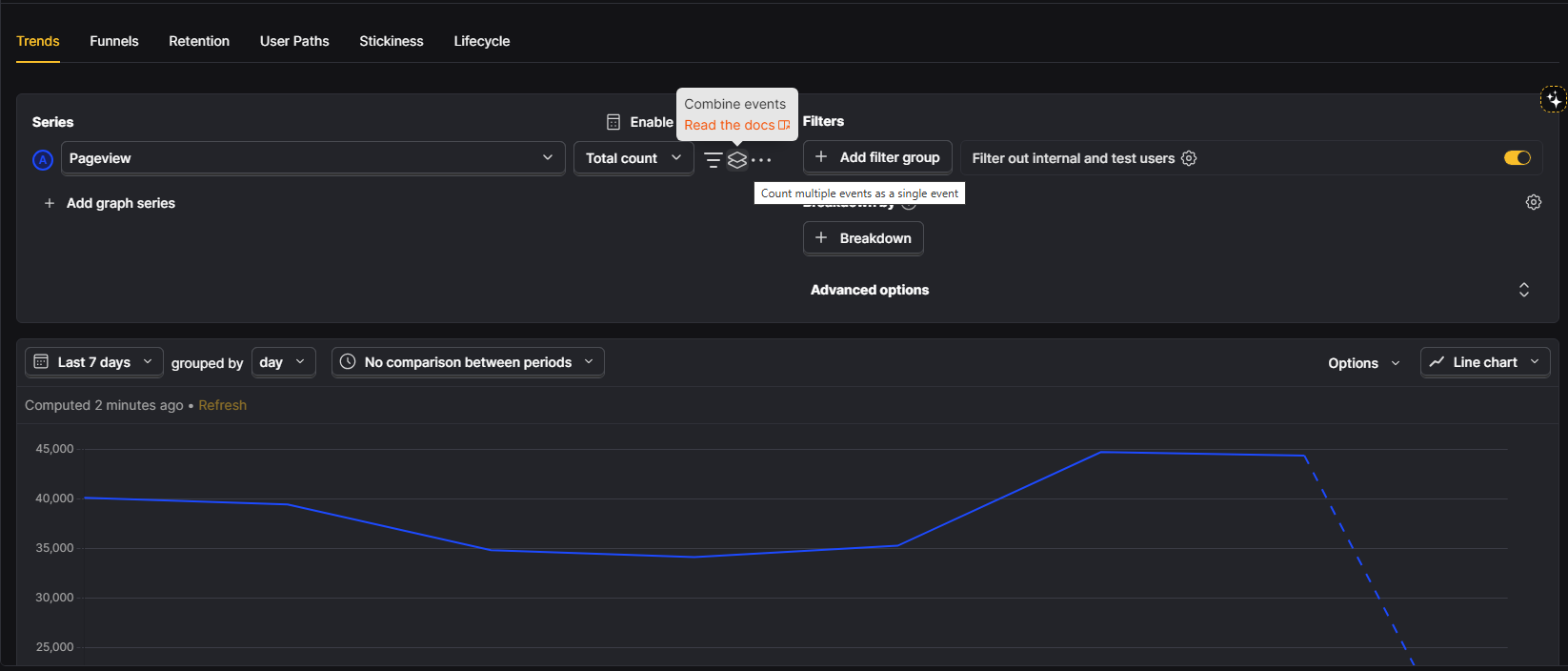
A tweak rolled out by PostHog on January 29, 2026 slipped under the radar – yet it cuts through common analytics hurdles. Instead of juggling separate data points, users now roll several events into one trendline without leaving the Trends tab. This shift streamlines how patterns are viewed. The update avoids fanfare but changes how smoothly insights come together.
One moment you’re asking how activation’s doing, next you hit a wall. Turns out, flipping the switch isn’t just one click. Getting value shows up in different ways – someone signs up, links a tool, builds their first thing. Each step counts. Teams used to build custom actions to track these pieces. Some even pulled raw numbers out and glued them together somewhere else. Sounds okay until names drift apart, tasks pile up, tracking slows down. What should take seconds now needs meetings.
Pick several events together, they show up as a single line on your graph. Behind the scenes, it works like an either-or rule: if any of those events happen, it adds to the total. Right away, this gives you clearer summaries – built straight from basic app data, no need to track extra named actions.
Why This Matters Especially for PMs and CEOs
Speed gets a boost when reports run clearer, building confidence slowly. Reports that move fast tend to feel more honest by default.
Quick answers happen when merging metrics during analysis. That split lets someone respond fast instead of getting stuck in extra work.
What you’re actually measuring shows up directly in the insight. This makes things clear. A person looking at the chart knows precisely which events count, since they do not need to trust an action label that could have changed meaning over time.
Sure, trust matters. It stops numbers from sliding off track. What worked before might not work now. When teams rename events, bring in fresh sign-up flows, or tweak how they log data, the original setup can lose touch fast. Either key moments vanish from reports or get mixed up with others. Building logic right into the analysis helps keep things clear. Definitions stay small, visible, directly linked where they’re used.
Where you’ll feel the impact immediately
- Activation and onboarding reporting
Rarely does turning something on happen in just one move. Right inside your setup, mix steps so activation fits how things actually unfold – like equal-value points strung together. Tracking its path? Go ahead. Split it by group or time slice later, no need to rebuild measurements each round. Pull apart user waves whenever clarity hits, all while leaning on what already exists. - “Any intent” or “any engagement” metrics
One way to track interest in buying? Look at actions such as viewing pricing, clicking upgrade, or starting a trial – all seen across days. Sometimes it makes sense to bundle behaviors: playing a video leads to scrolling most of the page, which connects with tapping a call-to-action button. - Feature adoption across multiple entry points
Now imagine someone tries a feature first on mobile, then later on desktop. Each time counts separately at the start. Merge those moments together so the numbers stay accurate. Paths differ but progress should add up right. One person might open it via menu or shortcut – both matter. Tracking each avoids missing real usage patterns. Seeing every entry point gives clearer results.
How to use it, cleanly
A string of unconnected moments might wiggle across the page, yet go nowhere. Hold the pieces close, or meaning slips away.
A single number tells more than a title ever could. Think activation means something real – like signing up, linking an app, or starting a project. Call it by what counts, not how it looks on screen. Six months from now, that name still makes sense without extra explanation. Clarity sticks around when context fades.
Sticking to clear meanings for each event matters. Mix Clicked button with Completed setup, results start looking better without real progress. Using OR opens the door wide – everything inside gets counted, no questions asked.
Bottom line
A single feature in PostHog Trends quietly shifts team dynamics – combining events inline isn’t loud, yet reshapes workflows. Defining meaningful metrics becomes simpler when actual user actions are tangled; no need to create or track separate actions anymore. Speed-focused product groups feel the impact most: their analytics stop being something they maintain, start becoming something they rely on.
Right now, while you track product stats in PostHog Trends, trying this makes sense – particularly when measuring how users activate, engage, stay involved. Then again, timing matters most if onboarding flow needs sharper clarity.
You can find the official PostHog documentation covering this update here.