

This guide focuses on integrating PostHog with TikTok Ads so you can send conversion events from PostHog directly into TikTok’s advertising ecosystem. If you are also setting up tracking for other paid channels, you can review our related guides for Google Ads, Meta Ads, and Reddit Ads.
The main benefit of this setup is better conversion data. Instead of sending only limited signals, you can use the richer user and event data already stored in PostHog to improve matching quality, attribution accuracy, and reporting inside TikTok Ads.
PostHog Destinations provide a native way to send that data in real time. The TikTok Ads Conversions destination is the built-in option for streaming conversion events from PostHog to TikTok without adding unnecessary implementation overhead.
Requirements
Before you begin, install and configure PostHog to capture the conversion events you want to send to TikTok Ads. The quality of this integration depends on having accurate and complete event data already in place within PostHog.
If that part is not in place yet, you can start with our PostHog installation guides or contact us for help with planning and implementation.
Where to begin
To get started, open the PostHog dashboard and navigate to Data management → Destinations. From there, find and select the TikTok Ads Conversions destination to begin the setup.

As with similar advertising integrations, TikTok Ads can usually be managed within a single destination. In most cases, the setup uses multiple mappings within the destination, each tied to a specific conversion action.
Connect your TikTok Ads account
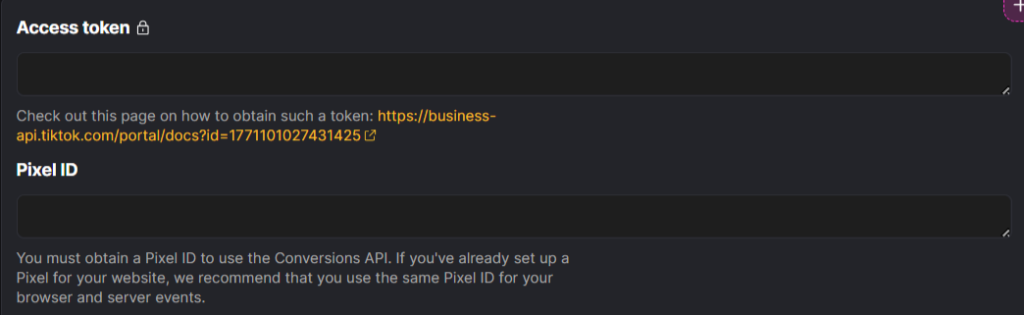
Next, connect your TikTok Ads account to PostHog. You will need two values for this step: your Pixel ID, which tells PostHog where the events should be sent, and your Access Token, which authorizes the connection with TikTok Ads.
Common fields
User properties
In this section, add the user fields that are consistently available across the events you plan to send.
TikTok’s matching works best when you send multiple reliable identifiers instead of relying on a single field. Advanced Matching fields, ttclid, cookies, IP address, and user agent can all help improve match quality and attribution.
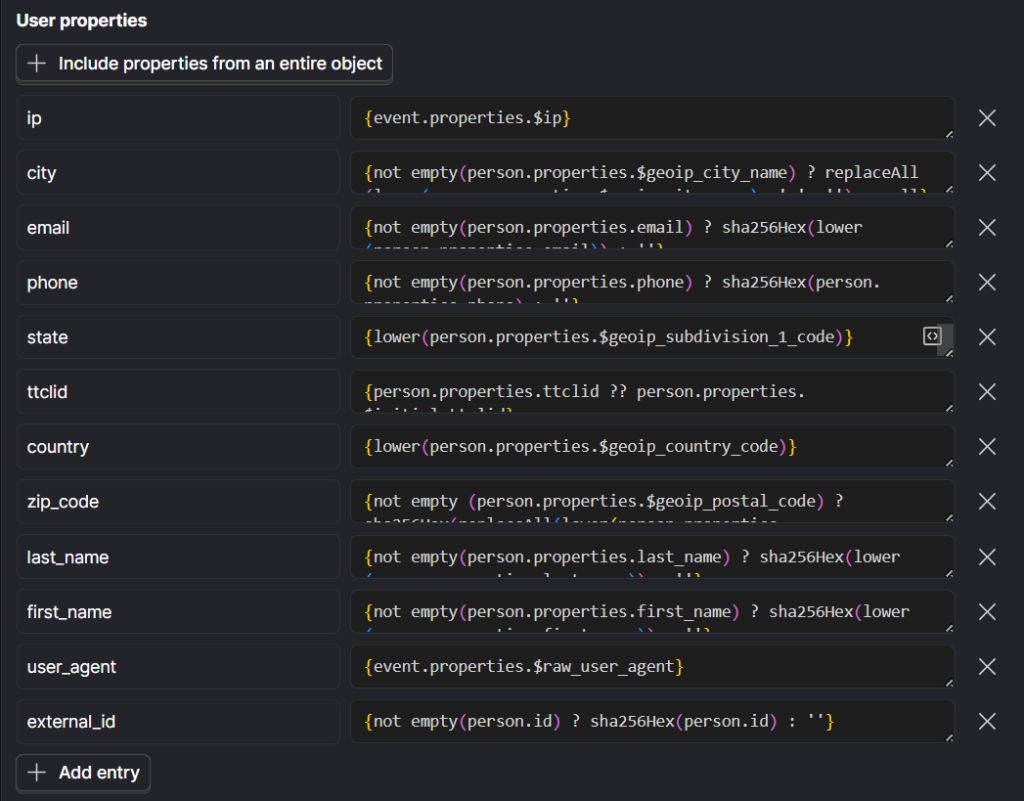
ip: For web and app events, this field is commonly mapped from {event.properties.$ip} and should contain the user’s non-hashed public IP address.
Sending the IP address together with user_agent improves matching quality and gives TikTok a better chance of connecting the event to the correct ad interaction.
ttclid: For web events, this field is commonly mapped from {person.properties.ttclid ?? person.properties.$initial_ttclid} and represents the TikTok Click ID captured from the landing page URL after an ad click.
When available, this is one of the strongest matching signals you can send because it helps TikTok connect the conversion directly to the originating ad interaction.
city: This field applies to web events only and is commonly mapped from {not empty(person.properties.$geoip_city_name) ? replaceAll(lower(person.properties.$geoip_city_name), ' ', '') : null}. It represents the city associated with the customer’s address.
To keep the value valid for matching, send it in lowercase and remove spaces, punctuation, and special characters.
email: For web, app, offline, and CRM events, this field is commonly mapped from {not empty(person.properties.email) ? sha256Hex(lower(person.properties.email)) : ''} and is used to send the customer’s email address as matching data.
Hash this field with SHA-256 before sending it to TikTok.
phone: For web, app, offline, and CRM events, this field is commonly mapped from {not empty(person.properties.phone) ? sha256Hex(person.properties.phone) : ''} and is used to send the customer’s phone number as an additional matching signal.
Hash this field with SHA-256 before sending it to TikTok.
state: For web events, this field is commonly mapped from {lower(person.properties.$geoip_subdivision_1_code)} and represents the state or province associated with the customer’s address.
country: For web events, this field is commonly mapped from {lower(person.properties.$geoip_country_code)} and represents the country associated with the customer’s address.
zip_code: For web events, this field is commonly mapped from {not empty(person.properties.$geoip_postal_code) ? sha256Hex(replaceAll(lower(person.properties.$geoip_postal_code), ' ', '')) : null} and represents the customer’s ZIP code or postal code.
Hash this field with SHA-256 before sending it to TikTok.
last_name: For web events, this field is commonly mapped from {not empty(person.properties.last_name) ? sha256Hex(lower(person.properties.last_name)) : ''} and represents the customer’s last name as an additional matching signal.
Hash this field with SHA-256 before sending it to TikTok.
first_name: For web events, this field is commonly mapped from {not empty(person.properties.first_name) ? sha256Hex(lower(person.properties.first_name)) : ''} and represents the customer’s first name as an additional matching signal.
Hash this field with SHA-256 before sending it to TikTok.
user_agent: For web and app events, this field is commonly mapped from {person.properties.$raw_user_agent} and represents the user agent string collected from the customer’s device. This value should be sent in its original, non-hashed form.
Sending user_agent together with the IP address improves event matching and helps TikTok associate activity with the relevant ad interaction more reliably.
external_id: For web and CRM events, this field is commonly mapped from {not empty(person.id) ? sha256Hex(person.id) : ''} and represents a unique identifier maintained on the advertiser’s side, such as a user ID, loyalty ID, or external cookie ID.
Hash this field with SHA-256 before sending it to TikTok.
Event-specific fields:
Alongside the common fields that apply across events, certain event types also require additional parameters to be passed. Rather than covering every possible option here, I will focus on the most important ones based on real-world usage and the parameters that are most often needed in implementation.
For the full list of standard events and supported event parameters, refer to TikTok’s official developer documentation. After working through the essentials in this guide, you can extend the setup further by adding any extra parameters your use case requires.
Mappings
This is where you define which PostHog events should be sent to TikTok Ads. PostHog provides a default mapping template to help you get started, but it should be adjusted to reflect your own event structure and conversion logic.
You can edit the default mappings, remove the ones you do not need, and add new ones so the destination matches the exact conversion events you want TikTok Ads to receive.
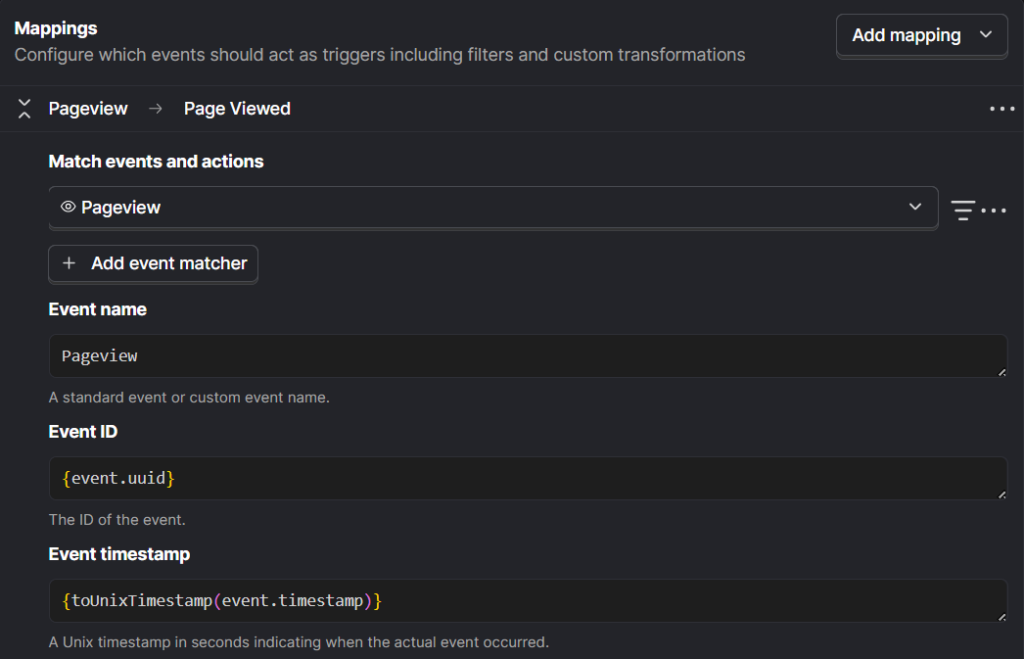
Here are the main fields to configure:
Match events and actions: Choose the PostHog event that best matches the conversion action you want to send to TikTok Ads. For example, if you want to send a Purchase event, map it to the PostHog event that represents a completed order or successful transaction. When needed, you can include multiple PostHog events in the same mapping.
Event name: TikTok supports eighteen standard events. Also, you can create as many custom conversion events as your setup requires by editing the default mappings.
The standard events supported by TikTok include:
Add Payment Info (AddPaymentInfo), Add to Cart (AddToCart), Add to Wishlist (AddToWishlist), Application Approval (ApplicationApproval), Purchase (Purchase), Complete Registration (CompleteRegistration), Contact (Contact), Customize Product (CustomizeProduct), Download (Download), Find Location (FindLocation), Initiate Checkout (InitiateCheckout), Lead (Lead), Schedule (Schedule), Search (Search), Start Trial (StartTrial), Submit Application (SubmitApplication), Subscribe (Subscribe), and View Content (ViewContent).
Event ID: This field plays a central role in deduplication, so it should contain a consistent value every time the event is triggered. In most cases, that means using a unique transaction-level identifier such as an Order ID, Booking ID, or another value that is generated only once and remains fixed.
Event timestamp: Use the timestamp that reflects when the event actually happened. If you have a custom event time available, map that here. If not, the default value {toUnixTimestamp(event.timestamp)} is usually sufficient.
Event properties:
This section contains the event-level properties sent with the conversion event payload.
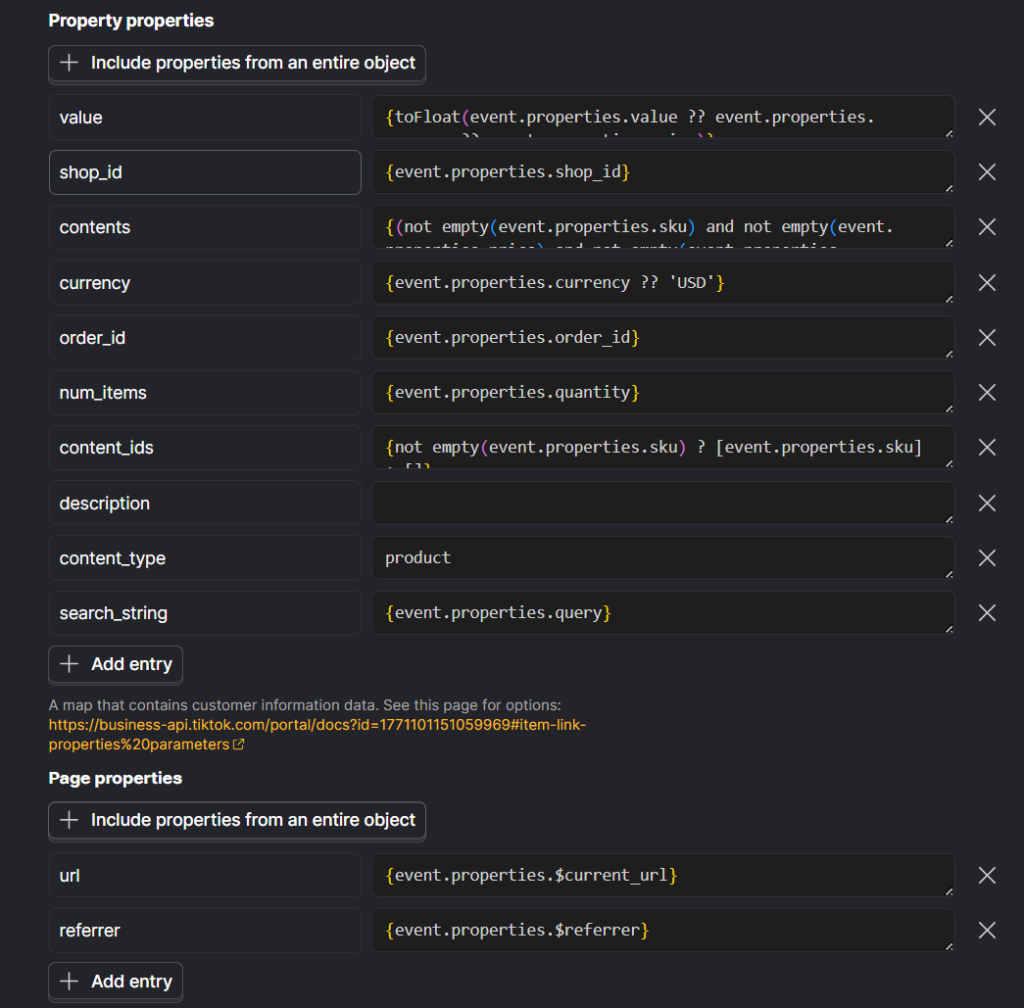
value: Use this field for the total value associated with the event. A common mapping is {toFloat(event.properties.value ?? event.properties.revenue ?? event.properties.price)}.
For purchase-related events, send the total order value rather than the unit price.
Always send this as a numeric value only. Do not include currency symbols, commas, text, or other non-numeric characters.
currency: This field specifies the currency for the value sent above. A common mapping is {event.properties.currency ?? 'USD'}.
content_ids: Use this field to send one or more unique product or content IDs associated with the event. This field is required for Video Shopping Ads (VSA).
PostHog prefills this field with {arrayMap(x -> x.sku, event.properties.products ?? [])}.
content_type: Use product if the IDs in content_ids or contents represent individual products. Use product_group if they represent product groups. This field is required for Video Shopping Ads (VSA).
contents: Use this field to send a list of product objects associated with the event.
PostHog prefills this field with {arrayMap(x -> ({'price': x.price, 'content_id': x.sku, 'content_category': x.category, 'content_name': x.name, 'brand': x.brand}), event.properties.products ?? [])}.
num_items: Use this field to send the total number of items associated with the event.
PostHog prefills this field with {arrayReduce((acc, curr) -> acc + curr.quantity, event.properties.products ?? [], 0)}.
order_id: Use this field to send the order’s unique identifier.
PostHog prefills this field with {event.properties.order_id}.
Page properties
These fields provide page-level context for the event and can be useful when TikTok needs the source page information tied to the conversion.
url: Use this field to send the full page URL tied to the event.
PostHog prefills this field with {event.properties.$current_url}
referrer: Use this field to send the referring page URL associated with the event.
PostHog prefills this field with {event.properties.$referrer}
Validate the setup with a test event code
During the testing phase, TikTok’s Test Event Code should be included so you can preview and confirm the events being sent from PostHog. This code is available in your Event Source settings and is useful for checking that the payload, mappings, and matching data are being passed as expected.
After the integration has been fully validated, remove the test code from the configuration. From that point forward, TikTok will treat all incoming events as live data.
Last Word
I hope this article has given you a clearer path for setting up TikTok Ads conversion tracking through PostHog. The recommendations throughout this guide are drawn from direct implementation experience across businesses working to improve measurement, attribution, and performance.
If you need support with a full PostHog setup that is aligned with your growth goals, not just the technical side of implementation, we would be happy to connect. You can fill out the Contact Us form to schedule a free consultation call with our co-founder and CEO, Iman Nazari.