
UTMs are small, but they decide whether your campaign reporting is usable.
When every campaign link follows the same naming rules, your analytics reports become easier to trust. You can see which channels bring visitors, which ads create qualified traffic, which emails drive conversions, and which campaigns deserve more budget.
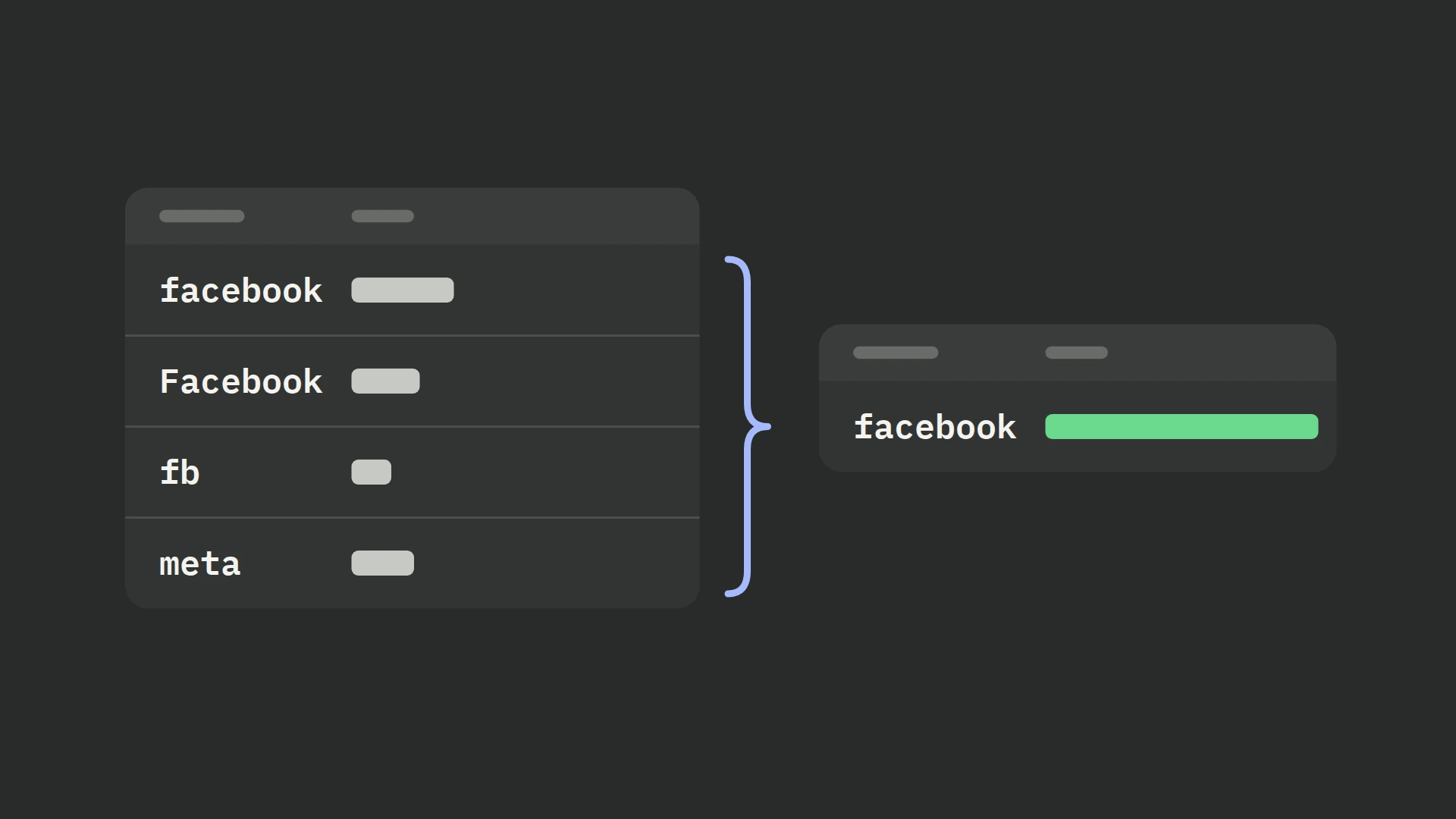
When UTMs are inconsistent, the opposite happens. facebook, Facebook, fb, and meta may all appear as separate sources. Paid traffic might be split between cpc, paid, paid-social, and ads. One campaign may show up under five slightly different names. The traffic is still there, but the story is broken.
Build consistent UTMs with one shared convention: standardize utm_source, utm_medium, and utm_campaign; add utm_term and utm_content when you need deeper reporting; test every link; and store final URLs in a shared registry. This makes attribution data easier to trust.
What Are UTM Parameters?
UTM parameters are tracking fields added to the end of a URL. They tell analytics tools where a visitor came from and which campaign, ad, link, or placement sent them.
A normal landing page URL might look like this:
https://example.com/winter-sale
A tracked campaign URL might look like this:
https://example.com/winter-sale?utm_source=facebook&utm_medium=paid-social&utm_campaign=winter-sale&utm_content=video-ad-01
When someone clicks the tracked URL, tools such as Google Analytics, PostHog, Shopify analytics, Hyros, or a CRM can use those parameters to classify the session, lead, purchase, or event.
That classification is what makes campaign reporting possible. Without UTMs, analytics tools may still detect some referrer data, but you lose control over the exact naming and grouping.
The Five Main UTM Parameters
Most teams use five standard UTM parameters:
| Parameter | What it identifies | Example |
|---|---|---|
utm_source | The platform, publisher, list, partner, or traffic source | google, facebook, newsletter, partner-site |
utm_medium | The channel or traffic type | cpc, paid-social, email, affiliate, referral |
utm_campaign | The campaign, promotion, launch, or initiative | black-friday-2026, webinar-signup, spring-sale |
utm_term | The keyword, audience, ad set, or targeting group | brand-keyword, lookalike-1, retargeting-30d |
utm_content | The creative, link, placement, or variation | hero-button, image-ad-02, footer-link |
Google also supports additional campaign parameters such as utm_id, utm_source_platform, utm_creative_format, and utm_marketing_tactic. You do not need all of these for every campaign, but utm_id can be useful when you import campaign cost data or want a stable campaign identifier.
For most marketing teams, the required starting point is:
utm_source
utm_medium
utm_campaign
Then add utm_term and utm_content when you need more detail.
When Should You Use Each UTM Parameter?
The easiest mistake is to treat UTMs like labels you invent campaign by campaign. That works for one launch. It breaks when five people are building links across ten channels.
Use each parameter for a specific job.
Use utm_source for the traffic source
utm_source should answer: where did this click come from?
Good examples:
google
facebook
instagram
linkedin
newsletter
youtube
affiliate-name
partner-name
Avoid mixing the source with the campaign or medium.
Weak example:
utm_source=black-friday-facebook-ad
Better:
utm_source=facebook
utm_medium=paid-social
utm_campaign=black-friday
This keeps your source reports clean. Facebook stays Facebook, no matter which campaign is running.
Use utm_medium for the channel type
utm_medium should answer: what kind of traffic is this?
Common examples:
cpc
paid-social
organic-social
email
affiliate
referral
influencer
display
sms
qr
The important part is not whether your team chooses paid-social or social-paid. The important part is choosing one and using it everywhere.
If one person uses cpc, another uses paid, and another uses ads, your paid traffic reports will fragment.
Use utm_campaign for the initiative
utm_campaign should group links that belong to the same promotion or initiative.
Good examples:
black-friday-2026
webinar-may-2026
posthog-implementation-guide
new-product-launch
abandoned-cart-sequence
Every channel used for the same campaign should share the same utm_campaign value.
For example:
utm_source=facebook&utm_medium=paid-social&utm_campaign=black-friday-2026
utm_source=google&utm_medium=cpc&utm_campaign=black-friday-2026
utm_source=newsletter&utm_medium=email&utm_campaign=black-friday-2026
That lets you compare campaign performance across channels without losing channel detail.
Use utm_term for keyword, audience, or ad set detail
utm_term is often used for paid search keywords. In practice, many teams also use it for audience or ad set labels.
Examples:
brand-keyword
competitor-keyword
lookalike-1
retargeting-30d
warm-leads
founders
Use this when the targeting matters for reporting. If you never analyze performance by keyword, audience, or ad set, you may not need it for every campaign.
Use utm_content for creative, placement, or link variation
utm_content should tell you which version of a link was clicked.
Examples:
video-ad-01
image-ad-02
green-button
header-link
footer-link
text-cta
story-placement
This is especially useful for A/B tests, email campaigns with multiple links to the same page, paid social creatives, and CRO experiments where you need to compare variants.
A Practical UTM Naming Convention
Here is a simple convention that works for most teams:
utm_source = platform-or-publisher
utm_medium = channel-type
utm_campaign = campaign-name
utm_term = keyword-audience-or-ad-set
utm_content = creative-placement-or-link
Use these formatting rules:
- Use lowercase only.
- Use hyphens instead of spaces.
- Do not use special characters unless your reporting setup explicitly supports them.
- Keep names readable.
- Do not include private customer data, emails, phone numbers, or personal identifiers.
- Use the same spelling every time.
- Keep a shared list of approved values for
utm_sourceandutm_medium.
Lowercase matters because analytics tools can treat values with different capitalization as different values. Facebook and facebook can become separate rows in reporting.
Hyphens matter because they make values readable without creating encoded spaces such as %20.
Example UTM Taxonomy for Marketing Teams
Use this as a starting point and adjust it to your own channels.
| Channel | utm_source | utm_medium | Notes |
|---|---|---|---|
| Google Search ads | google | cpc | Use utm_term for keyword or match type if needed |
| Meta paid ads | facebook or instagram | paid-social | Pick separate sources if you analyze Facebook vs Instagram |
| LinkedIn paid ads | linkedin | paid-social | Use utm_content for creative or placement |
| Organic LinkedIn post | linkedin | organic-social | Do not mix with paid social |
| Newsletter | newsletter or list name | email | Use utm_content for header, body, or footer link |
| Affiliate link | affiliate name | affiliate | Keep partner names standardized |
| Influencer link | influencer handle or name | influencer | Consider utm_campaign for the promotion |
| QR code | placement name | qr | Use utm_content for poster, packaging, or event location |
| Partner article | partner domain or name | referral | Keep source close to the publisher name |
The exact values can change, but the logic should not.
How to Build a UTM Link Step by Step
Use this process before launching any campaign link.
1. Start with the final destination URL
Use the real landing page URL that the visitor should reach.
Example:
https://example.com/winter-sale
Avoid tagging redirect URLs unless you have confirmed the redirect preserves query parameters. If UTMs disappear during a redirect, your analytics tool may never receive them.
2. Choose the campaign name
Pick one utm_campaign value for the whole initiative.
Example:
winter-sale-2026
Use that same campaign name across paid ads, emails, organic social posts, partner links, and retargeting campaigns related to the same initiative.
3. Choose source and medium from an approved list
Do not invent these on the fly. Use your team’s approved naming list.
Example:
utm_source=facebook
utm_medium=paid-social
This is where most attribution mess starts. Source and medium are used heavily in acquisition reports, so they need the strictest control.
4. Add term and content when they create useful reporting
If you are running one creative to one audience, you may not need extra fields.
If you are testing multiple creatives, placements, links, or audiences, add them.
Example:
utm_term=retargeting-30d
utm_content=video-ad-01
5. Build the full URL
The final tracked URL might look like this:
https://example.com/winter-sale?utm_source=facebook&utm_medium=paid-social&utm_campaign=winter-sale-2026&utm_term=retargeting-30d&utm_content=video-ad-01
Use Google’s Campaign URL Builder, your own spreadsheet, or a controlled internal form to avoid typos.
Use a UTM Builder Instead of Manual Typing
Manual UTM creation is fine for one link. It becomes risky when a team is creating dozens or hundreds of URLs.
A UTM builder helps enforce:
- Required fields.
- Approved source and medium values.
- Lowercase formatting.
- Hyphen formatting.
- Campaign naming rules.
- Final URL preview.
- Ownership and launch status.
For small teams, a spreadsheet is often enough. Add dropdowns for utm_source and utm_medium, formula-generated URLs, and a status column for review.
For larger teams, build a simple internal URL generator or use a dedicated UTM management tool.
The goal is not tooling for its own sake. The goal is fewer typos, fewer duplicates, and cleaner attribution.
Do Not Use UTMs on Internal Links
Do not add UTMs to links that move people around your own website or funnel.
For example, avoid this:
https://example.com/pricing?utm_source=homepage&utm_medium=internal&utm_campaign=pricing-click
Internal UTMs can overwrite the original acquisition source. A visitor who originally came from a paid ad may later click an internal UTM-tagged homepage button, and your reporting can start attributing that session to your own site instead of the original campaign.
Use event tracking for internal clicks instead.
For example:
event: clicked_pricing_cta
properties:
  location: homepage_hero
  button_text: view-pricing
That keeps acquisition attribution and on-site behavior tracking separate.
How to Verify UTM Tracking Before Launch
Verification is where many teams get lazy. Do not wait until the campaign has already spent money to find out the links are broken.
Use this checklist.
Check the URL itself
Open the final link in a browser and confirm:
- The page loads.
- All UTM parameters remain in the URL after redirects.
- No parameter is misspelled.
- Values are lowercase and hyphenated.
- The link does not contain personal data.
If the URL redirects and drops UTMs, fix the redirect before launch.
Check analytics real-time or debug views
Click the link from a clean browser session or incognito window.
Then check your analytics tool:
- In GA4, use Realtime or DebugView and inspect traffic source/campaign fields.
- In PostHog, check the person or event properties for the landing page view.
- In Shopify or your CRM, confirm the first landing page or attribution fields receive the expected parameters if your setup captures them.
Check the downstream conversion
Do not stop at the landing page. Follow the path through the key conversion action:
- Submit a lead form.
- Start checkout.
- Complete a test purchase.
- Book a call.
- Trigger the target event.
Then confirm the conversion can still be connected to the original UTMs.
This matters because UTMs can be captured correctly on the first page but lost before the CRM, checkout, or analytics event receives them.
Common UTM Mistakes That Break Attribution
Mixing capitalization
facebook, Facebook, and FACEBOOK can become separate values. Use lowercase only.
Using multiple names for the same medium
Pick one value. Do not split paid traffic between cpc, paid, ads, and paid-social unless each value has a clear reporting meaning.
Reusing the same UTM for different links
If two different creatives use the same utm_content, you will not be able to compare them later.
Changing links mid-campaign
If a campaign is already live, changing UTM values can split reporting. Create a new link only when you intentionally want a new tracking value.
Tagging internal links
Internal UTMs can overwrite the original source. Track internal clicks with events instead.
Letting redirects remove parameters
Some redirects, checkout flows, link shorteners, or landing page tools drop query parameters. Always test the full path.
Putting sensitive data in UTM values
Do not add email addresses, names, phone numbers, customer IDs, or private audience labels to URLs. URLs can be stored in analytics tools, browser history, logs, and third-party systems.
Relying on memory instead of a shared naming sheet
Even strong marketers forget exact names. Use a UTM registry.
A Simple UTM Registry Template
Create a shared spreadsheet with these columns:
| Column | Purpose |
|---|---|
| Destination URL | The final landing page |
| Final UTM URL | The generated tracked URL |
utm_source | Approved source value |
utm_medium | Approved medium value |
utm_campaign | Campaign name |
utm_term | Keyword, audience, or ad set |
utm_content | Creative, placement, or link variant |
| Owner | Person responsible for the link |
| Channel | Ads, email, social, affiliate, etc. |
| Launch date | When the link goes live |
| Status | Draft, approved, live, archived |
| Notes | Redirects, platform macros, test notes |
Add dropdowns for source, medium, and status. Lock formula cells so people cannot accidentally edit generated URLs.
Recommended Rules for Consistent UTMs
Use these as your baseline rules:
- Always use lowercase.
- Use hyphens, not spaces or underscores.
- Keep
utm_sourceas the platform, publisher, list, or partner. - Keep
utm_mediumas the channel type. - Keep
utm_campaignconsistent across all links in the same campaign. - Use
utm_contentfor creative or placement differences. - Use
utm_termfor keyword, audience, or ad set differences. - Do not use UTMs on internal website links.
- Do not include personal or sensitive data.
- Test links before launch.
- Save every final link in a shared registry.
- Do not edit live UTM values unless you intend to split reporting.
Why Consistent UTMs Improve CRO and Attribution
Clean UTMs do more than make reports look tidy.
They help you answer questions that directly affect growth:
- Which campaign actually brought qualified traffic?
- Which channel drove visitors who converted later?
- Which ad creative produced the strongest landing page engagement?
- Which email placement drove sales instead of just clicks?
- Which audience should receive more budget?
- Which experiment traffic should be included or excluded from analysis?
This is especially important for CRO work. If your source and campaign data is messy, conversion rate analysis becomes unreliable. You might think a landing page variant won because of the page, when the real reason was a different campaign mix. Or you might pause a channel that looks weak only because its traffic is split across several naming variations.
Consistent UTMs give your analytics, experimentation, and paid acquisition data a cleaner foundation.
Frequently asked questions
What are UTMs used for?
Which UTM parameters are most important?
utm_source, utm_medium, and utm_campaign. These tell you where the traffic came from, what type of channel sent it, and which campaign it belongs to.Do I need to use all five UTM parameters?
utm_source, utm_medium, and utm_campaign as the base. Add utm_term when keyword, audience, or ad set detail matters. Add utm_content when you need to compare creative, placement, or link variations.Should UTMs be lowercase?
Facebook and facebook can show up separately.Should I use spaces in UTM values?
spring-sale instead of spring sale. Hyphens make URLs cleaner and easier to read.Can I use UTMs on internal website links?
What is the difference between utm_source and utm_medium?
utm_source identifies the specific platform, publisher, or referrer, such as google, facebook, or newsletter. utm_medium identifies the traffic type, such as cpc, paid-social, email, or affiliate.How do I test if UTMs are working?
Can redirects remove UTMs?
Should I use a UTM builder?
Can UTMs contain personal data?
Final Takeaway
Reliable attribution starts before the campaign goes live.
If your UTM naming is loose, your reports will be loose too. If your team uses one shared convention, tests every link, and stores final URLs in a registry, your campaign data becomes much easier to trust.
Start simple: standardize utm_source, utm_medium, and utm_campaign. Then add utm_term and utm_content when you need deeper reporting.
Consistency is what turns UTMs from messy URL extras into a dependable marketing attribution system.