
Most teams already have useful agent workflows. The problem is that those workflows often live in one person’s local skill folder, a long prompt in a notes app, or a Slack message someone has to find again.
That is fragile for analytics and CRO work.
If one developer’s agent knows how to add a PostHog feature flag correctly, but another teammate’s agent does not, your implementation quality depends on who happened to run the task. If one analyst has a good workflow for writing experiment reports, but it is not shared, the team keeps rebuilding the same context by hand.
The PostHog skills store gives teams a central place to create, version, and reuse agent skills across MCP-connected tools like Claude Code, Cursor, Codex, Windsurf, VS Code, and similar agent environments.
This guide explains how the skills store works, when to use it, how to create a skill, how agents fetch skills, and how to maintain skills without turning them into another source of stale documentation.
At a glance
- Use the PostHog skills store when a workflow repeats across people or agent environments and consistency matters.
- Keep each skill focused: define when it runs, the steps it follows, the expected output, and the checks that prove the result.
- Treat skills as versioned operating procedures: fetch before updating, make the smallest change, review the diff, and test the new version on a low-risk task.
Who this guide is for
This guide is for teams that use AI agents for implementation, analytics, experimentation, product engineering, documentation, or repeated operational work.
It is especially useful if you:
- use PostHog for product analytics, feature flags, experiments, session replay, or error tracking;
- use coding agents across multiple tools or team members;
- have local
SKILL.mdfiles you want to make available to the whole team; - want non-engineers to help maintain reusable agent workflows;
- run repeated implementation work across clients, repositories, or product surfaces;
- need agent work to follow the same tracking, QA, naming, or reporting rules every time.
The core idea is simple: store the durable workflow once, then let any connected agent fetch the latest version when the task needs it.
What is the PostHog skills store?
The PostHog skills store is a centralized home for reusable agent skills.
A skill is a structured instruction set for an AI agent. It usually includes a body of instructions, similar to a SKILL.md file, plus optional metadata and bundled files such as scripts, references, or assets.
PostHog’s skills store follows the Agent Skills specification. That matters because the skill is not tied to one agent product. The same skill can be discovered and used by different MCP-connected agents.
In practice, a PostHog skill can tell an agent:
- when the workflow should be used;
- which files, tools, or data sources to inspect;
- which steps to follow;
- what output format to produce;
- which validation checks must pass;
- which mistakes to avoid.
For analytics work, that can mean turning repeated judgment into a reusable operating layer. Instead of re-explaining how to name PostHog events, QA feature flags, prepare experiment notes, or review tracking changes, you can encode the workflow once and keep it available to the team.
Why use PostHog as a skills store?
The main benefit is that your agent workflows stop being local, invisible, and inconsistent.
PostHog’s skills store is useful because it gives teams:
- Central management: update a skill once and teammates get the latest version the next time their agent fetches it.
- Version history: every update creates a new immutable version.
- Concurrency protection: updates can use
base_versionchecks so agents do not silently overwrite each other’s changes. - Bundled files: a skill can include scripts, reference docs, and assets next to the main instructions.
- Progressive disclosure: agents can list skills by name and description first, then fetch the full body only when relevant.
- Cross-agent use: the skill is available through MCP instead of being locked to one IDE or agent.
- Non-engineer contribution: teammates can create and maintain skills through the PostHog UI.
That last point is underrated. Some of the most valuable workflows are not pure code workflows. They are things like “how we review a tracking plan,” “how we write experiment summaries,” “how we check a dashboard before sending it to a client,” or “how we decide whether an event is trustworthy enough to use.”
Those workflows often live with analysts, growth leads, and operators. The skills store gives them a place to maintain that knowledge without asking every developer to manually sync local files.
How the PostHog skills store works
PostHog exposes the skills store through MCP tools.
Agents use those tools in a progressive way:
- The agent lists available skills by name and description.
- The agent decides which skill is relevant to the current task.
- The agent fetches the full skill body.
- If the skill includes bundled files, the agent fetches only the specific files it needs.
- The agent follows the skill instructions during the task.
This is better than loading every workflow into every session. The agent starts with a compact catalog, then pulls detailed instructions only when they are useful.
The main MCP tools are:
| Tool | What it does |
|---|---|
skill-list | Lists available skills with names and descriptions. |
skill-get | Fetches a skill body and its bundled file manifest. |
skill-file-get | Fetches one bundled file by path. |
skill-create | Creates a new skill, optionally with bundled files. |
skill-update | Publishes a new version using a full body, incremental edits, or file edits. |
skill-file-create | Adds one bundled file to a skill and publishes a new version. |
skill-file-delete | Removes one bundled file from a skill. |
skill-file-rename | Renames one bundled file. |
skill-duplicate | Duplicates an existing skill under a new name. |
What you need before you start
You need two things:
- A PostHog account.
- The PostHog MCP server configured in the agent environment where you want to use the skills.
If you install the PostHog AI plugin, you may not need to build your own bridge skill. PostHog’s documentation says the plugin includes an official skills-store skill that teaches the agent how to discover, load, create, and update skills through the PostHog MCP tools.
If you do not use the plugin, you can still call the MCP tools directly or create a small local bridge skill that points your agent to the canonical skill in PostHog.
Step 1: Decide what should become a skill
Do not turn every prompt into a skill.
A good skill is a repeatable workflow where consistency matters. It should help the agent make better decisions, not just give it a longer instruction block.
Good candidates include:
- adding PostHog analytics events according to your tracking plan;
- reviewing whether a feature flag implementation is safe to launch;
- writing experiment summaries from PostHog results;
- checking a dashboard before client handoff;
- preparing release notes from merged changes;
- auditing ad destination mappings;
- validating event naming, property naming, and source attribution rules;
- creating a standard bug investigation workflow for your product.
Weak candidates include one-off prompts, vague style preferences, or broad “do everything” instructions.
Use a skill when the workflow has a clear trigger, a known sequence, and validation criteria.
Step 2: Write the skill body
The skill body is the operational core. It should give the agent enough context to do the job without making the user restate the same instructions every time.
At minimum, include:
- the task the skill handles;
- when to use it;
- what context to inspect;
- the step-by-step workflow;
- expected output format;
- validation checks;
- known mistakes or limitations.
For example, a skill for experiment write-ups might specify:
- where to find PostHog experiment results;
- which primary and secondary metrics to inspect;
- how to handle inconclusive results;
- how to separate conversion lift from revenue or retention impact;
- how to format the final summary;
- which caveats must be included before calling a result a win.
That is more valuable than a generic “write a good experiment report” prompt because it preserves the team’s actual decision process.
Step 3: Create the skill in PostHog
You can create a skill through the PostHog UI or through MCP.
Create a skill through the UI
Use this route when you want a visible editing experience or when a non-engineer is maintaining the skill.
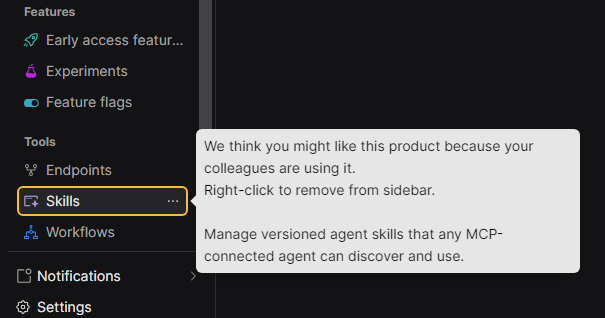
- Open the Skills area in PostHog.
- Click New skill.
- Add a descriptive kebab-case name, such as
posthog-experiment-summary. - Write a description that clearly explains when an agent should use the skill.
- Paste the skill body.
- Add optional fields such as
allowed_tools,license,compatibility, or metadata. - Add bundled files if the workflow needs scripts, references, or assets.
- Click Create skill.
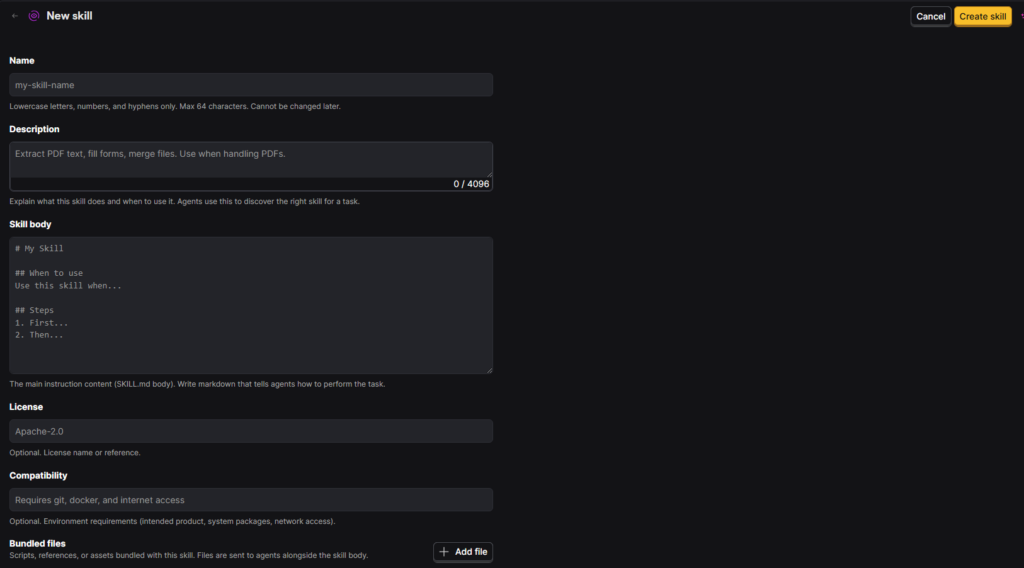
The description is especially important because agents use it during discovery. If the description is vague, the agent may not know when to fetch the skill.
Create a skill through MCP
You can also ask an MCP-connected agent to create the skill with skill-create.
A simple request might be:
Use the PostHog MCP skill-create tool to create a skill named
"posthog-experiment-summary" with the content I provide.
The direct payload can include the skill name, description, body, allowed tools, metadata, and bundled files.
{
  "name": "posthog-experiment-summary",
  "description": "Write experiment summaries from PostHog results. Use when the user asks to turn an experiment readout into a decision-ready summary.",
  "body": "# PostHog experiment summary\n\nUse this workflow when...",
  "allowed_tools": ["Read", "Grep"],
  "metadata": {
    "author": "99ways",
    "category": "experimentation"
  }
}
The exact tools you allow should match the workflow. A writing skill may only need read/search tools. An implementation skill may need code editing tools. A skill that updates PostHog objects should be much more tightly reviewed.
Step 4: Add bundled files when the workflow needs them
Bundled files are useful when the skill depends on more than the main instruction body.
Use bundled files for:
- reference documents;
- reusable scripts;
- templates;
- examples;
- checklists;
- asset files;
- query snippets.
For example, an analytics QA skill might include:
references/event-naming.mdreferences/dashboard-handoff-checklist.mdscripts/check-events.pytemplates/client-summary.md
Agents do not need to load every bundled file up front. They can inspect the manifest, then fetch a specific file with skill-file-get only when the task requires it.
That keeps the session lighter while still making deeper context available.
Step 5: Use a skill from any connected agent
Once the skill exists in PostHog, any teammate with the PostHog MCP server configured can use it.
The agent can list available skills:
Use PostHog MCP to list available skills.
It can also search for a specific kind of skill:
Use PostHog MCP to search skills for "experiment summary".
Then it can fetch and run the relevant skill:
Use PostHog MCP to fetch "posthog-experiment-summary" and follow it to summarize this experiment readout.
Behind the scenes, the agent calls skill-get, reads the skill body, fetches any needed bundled files, and follows the instructions.
This is where the business value shows up. The agent is no longer improvising from a generic request. It is following the same workflow your team agreed to use.
Step 6: Use a bridge skill if your agent needs one
Some environments support local skills. In that case, you can create a small bridge skill that tells the agent to fetch the real instructions from PostHog.
The bridge should stay thin. Its job is not to duplicate the full workflow. Its job is to point the agent to the canonical version in the PostHog skills store.
That gives you one local entry point and one central source of truth.
This is optional if your agent can already use the PostHog AI plugin or call the PostHog MCP skill tools directly.
How to update and version skills
Skills should evolve as the team learns.
PostHog publishes each skill-update as a new immutable version. That gives you a history of what changed and lets you review diffs in the UI.
The safest update workflow is:
- Fetch the current skill first.
- Check the current version.
- Make the smallest useful change.
- Publish the update with
base_version. - Review the diff.
- Ask another agent or teammate to use the updated version in a real task.
PostHog supports several update styles:
- full body replacement for larger rewrites;
- incremental
editsfor exact find-and-replace changes; file_editsfor updating one bundled file;- per-file tools for adding, deleting, or renaming bundled files.
Use the smallest update method that fits the change.
For example, if you only need to change a heading or add one rule, an incremental edit is safer than resending the whole skill body. If you only need to update a bundled reference file, use a file edit instead of replacing the whole bundle.
Avoid replacing the entire file bundle unless you intentionally want to reseed every bundled file. Otherwise, you risk dropping supporting files by accident.
How to port a local skill into PostHog
If your team already uses local SKILL.md directories, the skills store can turn them into shared assets.
Use this process:
- Read the local
SKILL.md. - Use its frontmatter for fields such as
name,description,license,compatibility,allowed_tools, and metadata. - Use the content after the frontmatter as the skill body.
- Collect useful files from folders such as
scripts/,references/, andassets/. - Create the skill in PostHog with the body and bundled files.
- Ask a teammate’s agent to list and fetch the skill to verify it is available.
This is especially useful for agencies or product teams that have accumulated good local workflows but have no reliable way to distribute updates.
Skills vs prompts in PostHog
PostHog also has prompt tools for reusable text prompts.
Use prompts for simple text blocks, short reusable instructions, or runtime generation prompts that do not need structured metadata.
Use skills when the workflow needs:
- structured metadata;
- discovery by agent description;
- bundled files;
- tool permissions;
- version history;
- team-level reuse;
- a multi-step operating procedure.
When in doubt, use a skill for workflows and a prompt for plain text.
Why this matters for CRO and analytics teams
CRO and analytics work depends on repeatable judgment.
Small implementation differences can change the quality of the data:
- one event fires on click while another fires after the business action is complete;
- one experiment summary checks downstream revenue while another stops at signup rate;
- one dashboard review includes internal traffic filtering while another forgets it;
- one feature flag workflow validates logged-in and logged-out states while another only checks the happy path.
Those differences become decision risk.
A central skills store helps turn your best workflows into reusable team infrastructure. It will not replace expert review, but it can reduce avoidable drift in how agents perform repeated work.
For 99Ways-style implementation, that means better measurement discipline, cleaner experiments, stronger attribution workflows, and less time spent re-teaching the same process to every session.
Common mistakes to avoid
Writing vague skill descriptions
The description is what agents see before fetching the full skill. Make it specific.
Weak description:
“Helps with analytics.”
Better description:
“Review PostHog event instrumentation against a tracking plan. Use when the user asks to QA event names, properties, trigger timing, identity handling, or validation evidence.”
Creating one giant skill for everything
Keep skills focused. One task per skill is easier to discover, easier to trust, and easier to update.
Use separate skills for experiment summaries, dashboard handoff, event QA, ad destination audits, and feature flag implementation if those workflows have different steps.
Forgetting to fetch before updating
Always fetch the current version before publishing an update. Use base_version so you do not accidentally overwrite someone else’s change.
Replacing the whole bundle for a small file change
If only one bundled file changed, update that file. Do not replace the whole bundle unless that is truly the goal.
Storing secrets in skills
Skills should contain reusable instructions, templates, scripts, and references. Do not store API keys, private credentials, or client-sensitive secrets inside a broadly shared skill.
Treating a skill as proof of correctness
A skill gives the agent a better workflow. It does not prove the output is correct.
For analytics implementation, still verify real events, feature flag behavior, experiment exposure, dashboard filters, and downstream business metrics before trusting the result.
How to verify the setup
After creating or updating a skill, run a simple verification pass.
Check that:
- the skill appears in
skill-list; - the description is clear enough for an agent to choose it;
skill-getreturns the expected body;- bundled files appear in the returned manifest;
- a single bundled file can be fetched with
skill-file-get; - a teammate or second agent environment can fetch the same skill;
- the skill produces the expected output on a low-risk task;
- the PostHog UI shows the new version and diff after updates.
For implementation skills, also verify the real system outcome. If the skill modifies tracking, check the resulting PostHog events. If it writes an experiment report, check the experiment metrics and breakdowns. If it changes feature flag code, inspect the loaded flag state without creating exposure events and test the flag behavior.
Best practices for team workflows
Use descriptive kebab-case names
Names like review-frontend-pr, write-api-docs, and posthog-event-qa are easier for people and agents to scan than broad names like helper or analytics.
Invest in descriptions
The description is part of the routing system. Write it as a trigger condition: “Use when the user asks to…”
Discover before creating
Before creating a new skill, list existing skills. This avoids duplicate workflows with slightly different names and conflicting rules.
Put durable references in bundled files
If the skill needs examples, checklists, or long reference material, put them in bundled files. Keep the main body focused on the workflow.
Let agents suggest improvements
After an agent uses a skill, ask what was missing or ambiguous. If the suggestion is good, update the skill so the next session benefits.
Review skill changes like process changes
An updated skill can change how multiple teammates’ agents behave. Review important updates the same way you would review a change to an internal playbook.
Frequently asked questions
What is a PostHog skill?
A PostHog skill is a reusable agent workflow. It includes a body of instructions, optional metadata, optional tool permissions, and optional bundled files such as scripts, references, or assets.
Which agents can use PostHog skills?
Any agent environment with the PostHog MCP server configured can use the skills store. PostHog's docs mention tools such as Claude Code, Cursor, Codex, Windsurf, and VS Code.
Do I need the PostHog AI plugin?
Not always. The plugin can make setup easier because it includes an official skills-store skill, but agents can also use the PostHog MCP skill tools directly if configured.
Can non-engineers create skills?
Yes. Skills can be created and maintained through the PostHog UI, which makes the store useful for analysts, growth leads, operators, and other teammates who own process knowledge.
What is the difference between a skill and a prompt?
Use a prompt for simple reusable text. Use a skill for a structured workflow that needs metadata, discovery, bundled files, tool permissions, versioning, or multi-step execution.
What are bundled files?
Bundled files are supporting files stored with a skill, such as scripts, references, templates, examples, assets, or checklists. Agents can fetch them on demand.
How do skill updates work?
Each skill update publishes a new immutable version. Agents get the latest version the next time they fetch the skill.
What is base_version?
base_version is a concurrency check used during updates. It helps prevent one update from accidentally overwriting changes made by someone else.
Should every repeated prompt become a skill?
No. Create skills for workflows where consistency, validation, and team reuse matter. Keep simple one-off text as prompts or ordinary instructions.
Can I move local skills into PostHog?
Yes. Read the local SKILL.md, use its frontmatter and body to create the PostHog skill, and include useful files from folders such as scripts/, references/, and assets/.
How do I know a skill is working?
Verify that it appears in skill-list, can be fetched with skill-get, exposes expected bundled files, and produces the right output on a low-risk test task.
Final takeaway
The PostHog skills store turns agent workflows into shared team infrastructure.
Instead of relying on local files, copied prompts, or tribal knowledge, you can keep reusable workflows in one versioned place and let every connected agent fetch the latest instructions when needed.
For CRO, analytics, and product teams, that is not just a convenience. It helps protect the quality of the systems your decisions depend on: tracking plans, feature flags, experiments, dashboards, and implementation QA.