
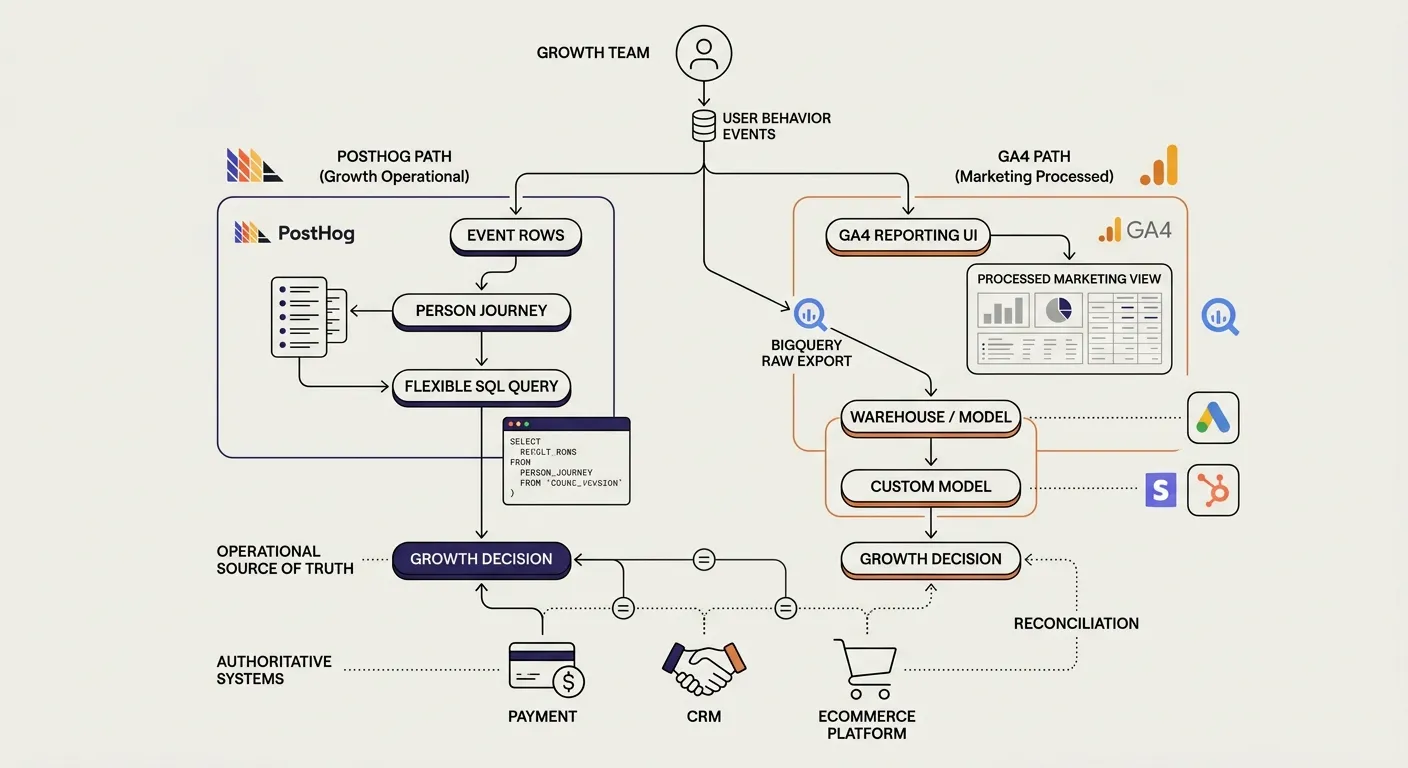
For most growth teams, PostHog is better suited than the GA4 reporting interface to be the operational source of truth.
The reason is not that GA4 cannot collect events. It can. The difference is how directly you can inspect those events, connect them to people and business outcomes, and query the data around the question you are trying to answer.
PostHog makes event rows, person histories, behavioral analysis, SQL, session replay, feature flags, and experiments part of the same working environment. GA4 is strongest as a standardized acquisition and marketing reporting layer, particularly inside the Google ecosystem.
There is one important exception: GA4 can export raw event data to BigQuery. If your team uses BigQuery to reproduce metrics, join billing and CRM data, and resolve disagreements with the GA4 interface, then BigQuery or the broader warehouse has become the source of truth.
The practical answer is:
- Use PostHog as the decision layer when you need inspectable user behavior, flexible event queries, funnel diagnosis, and experimentation.
- Keep GA4 for Google-centric acquisition reporting, Google Ads integration, and its processed or modeled marketing views.
- Use a data warehouse as the canonical layer when the business has enough systems and analytical maturity to model the truth independently.
What does “source of truth” mean in analytics?
A source of truth is not simply the dashboard most people open.
It is the data layer from which a decision-critical claim can be inspected, reproduced, challenged, and reconciled with business reality.
Suppose a report says that Campaign A produced EUR 18,400 in revenue. A trustworthy source should let you answer:
- Which purchases make up that number?
- What does “purchase” mean?
- Which identifiers connect each purchase to a person or journey?
- Which attribution rule assigned the purchase to Campaign A?
- Does the value include tax, shipping, refunds, renewals, or cancellations?
- Can the calculation be reproduced?
- How closely does it reconcile with the payment processor or ecommerce platform?
- Were any rows modeled, sampled, grouped, thresholded, or excluded?
- Can the same data answer a related question tomorrow?
The transaction system remains authoritative for whether a payment occurred. The CRM remains authoritative for whether a lead became a customer. The analytics source of truth must connect those outcomes to the journey and make the resulting metric defensible.
A useful trust chain is:
business outcome -> event -> identity -> journey -> acquisition context -> metric definition -> query -> decision
The platform that makes this chain easiest to inspect should govern the growth decision.
The decisive difference is access to the analytical substrate
PostHog is built around the event stream.
Its SQL layer can query the events table directly, filter and transform properties, join events to persons, and combine PostHog data with external sources such as Stripe or HubSpot. PostHog’s own documentation shows SQL queries running directly against events and describes using external warehouse sources in the same analysis environment. (PostHog: SQL access)
That creates a useful escape hatch.
You can start with a funnel or trend report. When the result looks strange, you can move closer to the underlying records:
- inspect the events behind the metric;
- examine the properties on a specific event;
- follow one person’s sequence of actions;
- compare browser and server events;
- identify missing values or duplicate transactions;
- write a query that matches the business definition;
- join product behavior to billing or CRM outcomes.
The point is not that every growth operator should write SQL. The point is that the platform does not force the business question to fit only the reports designed in advance.
This is not the same as being a CDP
If the main problem is enforcing one event schema and routing governed data to many downstream tools, that is a different decision. See PostHog vs Twilio Segment: Product Analytics or CDP? rather than treating an analytics interface as a complete customer-data platform.
GA4 takes the opposite default approach. It provides standardized reports and Explorations over an event-based collection model. For common acquisition questions, this is efficient. The platform decides much of the reporting structure, metric behavior, identity logic, and attribution presentation so users can get useful answers without building an analytical model.
That convenience becomes a constraint when the question is unusual, bottom-of-funnel, or commercially specific.
GA4 can collect a custom event parameter without making it immediately available as a reporting dimension. The parameter generally must be registered as a custom definition for the Data API and report surfaces, and standard properties have finite custom-definition quotas. BigQuery still contains the collected event parameter. This is not necessarily data loss, but it means the UI rewards questions anticipated during configuration. (Google: Data API custom dimensions, Google: custom-definition limits)
GA4 does have event-level data
A fair comparison must correct a common overstatement: GA4 is not only aggregated dashboards.
GA4 provides several ways to move toward the underlying activity:
- DebugView for implementation testing;
- Realtime reporting;
- User Explorer for pseudonymous user journeys;
- the Data API for customized report queries; and
- BigQuery export for raw event data.
Google describes the BigQuery export as access to the raw events collected by a GA4 property. The export contains event names, timestamps, parameters, user identifiers, device information, ecommerce fields, and other collected records that can be queried with SQL. (Google: BigQuery export overview)
This matters because it changes the comparison.
The defensible claim is not:
PostHog exposes raw events and GA4 does not.
It is:
PostHog makes direct event access and flexible querying part of the primary analytics workflow. GA4 can provide similar raw access through BigQuery, but doing so creates a separate data-engineering layer.
Once the team depends on that layer for canonical metrics, joins, retention, and reconciliation, the source of truth is no longer the GA4 interface. It is BigQuery or the warehouse model built on top of it.
GA4 reports and BigQuery are not expected to match perfectly
Google explicitly documents that its standard reporting surfaces add information and processing that are not fully available in the BigQuery event export.
Those additions can include:
- reporting identity;
- Google Signals;
- behavioral and key-event modeling;
- attribution;
- predictions;
- approximate user and session counts;
- report aggregation; and
- high-cardinality grouping.
Google states that, for many use cases, the standard reports and BigQuery export are not expected to be reconcilable for these value-added parts. (Google: Bridge the gap between the GA4 UI and BigQuery export)
Several mechanisms explain the difference.
GA4 can approximate unique users and sessions
GA4 uses HyperLogLog++ to estimate cardinality for metrics such as Active Users and Sessions. BigQuery can calculate exact distinct counts from the exported identifiers. Small differences are therefore possible even when both calculations are internally valid. (Google: Unique count approximation in Google Analytics)
Flexible GA4 reports can be sampled
It would be inaccurate to say that every GA4 report is sampled.
However, Explorations on a standard GA4 property are subject to a 10-million-event sampling limit per query, and the Data API can also return sampled results for large or complex requests. Google recommends BigQuery when a use case requires full, unsampled, event-level data. (Google: GA4 360 limits, Google: Reporting data expectations)
High-cardinality values can be grouped
When a report exceeds the cardinality limit of its underlying table, GA4 reporting surfaces can group less frequent dimension values into an (other) row. Google notes that this grouping occurs in the reporting module and Data API, while BigQuery retains the granular rows. (Google: GA4 UI versus BigQuery export)
This matters for dimensions such as product IDs, page paths, campaign content, ad identifiers, internal account IDs, or other fields with many distinct values.
Google Signals is not exported to BigQuery
Google Signals can help GA4 deduplicate signed-in users across devices in standard reports. The Signals information itself is not included in the BigQuery export.
A person using three browsers may therefore appear as one user in a Signals-influenced report but as three pseudonymous identifiers in BigQuery unless the business also implements its own User-ID correctly.
Modeled data is not raw event data
When consent mode is used, GA4 may add behavioral or key-event modeling to standard reporting surfaces. That modeled data is not included in the raw BigQuery event export.
Modeling can be useful for aggregate marketing decisions. It is not an inspectable event record. A team must know whether it is asking:
- what was directly observed;
- what GA4 estimated; or
- what the business’s own systems recorded.
These are different forms of evidence.
Is there really a 50-user threshold in GA4?
There is no official universal 50-user rule.
Google states that data thresholds are system-defined and cannot be adjusted. The exact cutoff is not published. Thresholding exists to prevent a report from allowing the viewer to infer the identity or sensitive characteristics of a small group. (Google Analytics Help: About data thresholds)
Google’s current help page specifically names demographic data, audiences defined using demographic data, and search-query information. It also notes that narrow date ranges with low user or event counts can make withholding more likely.
That leads to four important corrections.
1. A low-volume purchase event is not automatically hidden
If a business receives 17 purchases in a month, GA4 does not have a documented rule that says those 17 purchase events must disappear.
The risk depends on the reporting surface, dimensions, metrics, reporting identity, and privacy context used to analyze them.
2. Narrow breakdowns can become less reliable or unavailable
A report combining a rare conversion with a small audience, demographic category, location, campaign, or other granular dimension may be thresholded, grouped, or otherwise difficult to interpret.
This is precisely where low-volume, high-value businesses feel the limitation most sharply: the aggregate count may exist, but the commercially useful breakdown can become fragile.
3. Thresholding is not the only constraint
For small but valuable outcomes, several different mechanisms can be confused:
- privacy thresholding;
- high-cardinality
(other)grouping; - missing or unregistered custom dimensions;
- reporting-identity effects;
- data retention;
- attribution scope;
- incomplete User-ID implementation;
- sampling in an Exploration or API request; and
- simple instrumentation failure.
An audit must identify which mechanism is responsible rather than blaming every missing row on thresholding.
4. BigQuery is the raw-data escape hatch
The raw event export allows the team to inspect the collected purchase rows even when a standard report is not suitable. But again, BigQuery does not include every modeled or Signals-derived value shown in the GA4 interface.
The conclusion is not that GA4 is unusable below 50 users. It is that the GA4 interface is not always the cleanest environment for investigating rare, high-value outcomes at the level required for growth decisions.
PostHog’s advantage is that event-level inspection and arbitrary querying are closer to the default operating model.
PostHog vs GA4 for growth decisions
| Decision requirement | PostHog | GA4 | Practical implication |
|---|---|---|---|
| Inspect an exact event and its properties | Direct event and person activity, plus SQL over event rows | DebugView and User Explorer provide limited inspection; BigQuery provides raw rows | PostHog keeps the investigation in one product; GA4 often requires a shift to BigQuery |
| Ask a new business-specific question | Funnels, trends, cohorts, paths, and HogQL over events, persons, and connected sources | Standard reports and Explorations cover many questions; arbitrary analysis is strongest in BigQuery | PostHog is generally faster for a changing growth backlog |
| Diagnose one customer’s journey | Explicit person histories when identity is implemented correctly | User Explorer can show pseudonymous journeys; BigQuery can reconstruct them | Both can work, but PostHog treats person-level behavior as a primary workflow |
| Analyze rare purchases or booked calls | Inspect each observed event and query any available properties | Event counts can be available; narrow reports may encounter thresholding, cardinality, identity, or retention constraints; BigQuery exposes raw collected rows | The real distinction is workflow and transparency, not a universal 50-user cutoff |
| Reconcile revenue with Stripe, ecommerce, or CRM | Query external sources with PostHog data or send authoritative backend events | Join GA4 export with first-party data in BigQuery | Both require implementation; PostHog is integrated, while GA4’s strongest path becomes a warehouse project |
| Understand acquisition inside the Google ecosystem | Supports UTMs, referrers, custom source properties, and marketing analytics | Strong standardized acquisition reports and native Google Ads context | GA4 should usually remain available for Google marketing reporting |
| Control identity logic | Explicit distinct_id, identify(), aliases, and person properties; the team owns the implementation | User-ID, device identifiers, reporting identity, Google Signals, and modeling can all affect reports | PostHog is more explicit; GA4 can provide richer modeled views but is harder to reproduce exactly |
| Connect analysis to experiments | Analytics, feature flags, exposure, replay, and experiment results share the same event model | GA4 can measure treatment outcomes but does not provide the same integrated experiment delivery and diagnostic loop | PostHog is better suited to an operational growth program |
| Preserve a canonical historical dataset | Cloud retention and warehouse/export options depend on configuration and plan | Standard UI exploration retention is limited; BigQuery export provides the durable raw layer from the moment it is enabled | A warehouse is preferable when long-term canonical storage is essential |
| Minimize data-engineering dependence | Complex analysis can often remain inside PostHog | GA4 is easy for standard reports; advanced raw analysis requires BigQuery, SQL, and modeled tables | The simpler option depends on whether the questions are standard or custom |
A bottom-of-funnel question exposes the real difference
Consider a lead-generation business asking:
Which Meta ad produced booked calls that attended, became paying customers within 45 days, and generated the highest net realized revenue after refunds?
This is not one metric. It is a data chain.
The business needs:
- the landing session;
- source, campaign, ad-set, ad, and click identifiers;
- a stable anonymous identifier;
- a known lead or customer identifier after form completion;
- the booked-call event;
- attendance and qualification status from the CRM;
- the payment event from the authoritative payment system;
- refunds or cancellations;
- a 45-day outcome window; and
- a documented attribution rule.
How the question works in PostHog
With a deliberate implementation, PostHog can preserve the acquisition properties, identify the user when they become known, receive downstream CRM and payment events, and expose the complete journey in person activity.
The team can then write a query or build an insight around the exact business definition. If a result looks wrong, the analyst can inspect the contributing events and identify whether:
- ad identifiers are missing;
- the lead was never identified;
- a CRM outcome failed to arrive;
- payments were duplicated;
- refunds were ignored; or
- attribution was overwritten.
The platform does not make the result correct automatically. It makes the evidence and defects inspectable.
For the detailed acquisition conventions, use a dedicated UTM and click-ID system rather than improvising campaign names inside the query. See 99ways’ guide to building consistent UTMs for reliable marketing attribution.
How the question works in the GA4 interface
GA4 can report acquisition, key events, and revenue. A carefully instrumented property may answer parts of the question through standard reports or Explorations.
The complete business question is harder because it depends on custom CRM states, a long outcome window, net revenue, user-level joins, and ad-level identifiers. Relevant event parameters may need to be registered as custom dimensions. Reporting identity and attribution scope must be understood. A granular Exploration may encounter sampling or reporting constraints.
User Explorer can help inspect an individual pseudonymous journey, but it is not a substitute for a reusable business dataset.
How the question works in GA4 BigQuery
BigQuery can answer the question.
The team can query raw GA4 events, join CRM and payment tables, implement the 45-day window, calculate refunds, and create its own attribution model.
At that point, however, the authoritative calculation is the SQL model in BigQuery. The GA4 interface is one input and reporting surface, not the source of truth.
This is the central comparison:
PostHog gives many growth teams a direct route from event evidence to decision. GA4 reaches comparable flexibility by handing the raw events to a warehouse.
Identity is more explicit in PostHog, but not automatically better
PostHog assigns an anonymous identifier and lets the implementation call identify() when the user becomes known. Its documentation explains how this links anonymous behavior to a stable distinct ID and allows frontend and backend events to use the same identity. (PostHog: Identifying users)
This is valuable because the identity logic is visible and testable.
It is also a responsibility. A poor implementation can:
- identify too early;
- use mutable values;
- send different IDs from frontend and backend;
- merge people incorrectly;
- fail to reset on shared devices;
- fragment one person across domains or apps; or
- attach a purchase to the wrong profile.
GA4’s reported user counts can reflect several identity-related mechanisms: a business-provided User-ID, device or app identifiers, and – depending on configuration and eligible data – Google Signals and modeled behavior.
Those mechanisms can improve aggregate cross-device reporting. They can also produce counts that are not fully reproducible from BigQuery because Signals and modeled data are not exported at row level.
The relevant question is not which platform has the most sophisticated identity feature. It is:
Can the team explain why two events belong to the same person, and is that identity sufficient for the decision being made?
A PostHog implementation that fails this test is not trustworthy merely because PostHog exposes more data. The PostHog Audit: 12 Checks Before You Trust the Data article covers the full identity, acquisition, event, and revenue validation chain.
GA4 is stronger for standardized acquisition reporting
GA4’s strongest role is not accidental.
It is deeply connected to Google’s advertising and measurement ecosystem. It provides familiar acquisition dimensions, standardized channel groupings, Google Ads context, attribution reports, consent-related modeling, and a reporting language widely understood by marketing teams.
A company may rationally keep GA4 even when PostHog is the operational source of truth.
GA4 can answer:
- How is Google categorizing traffic?
- What does the Google Ads-linked reporting layer show?
- How do standard acquisition channels compare?
- What modeled or Signals-influenced view is available for marketing planning?
- What data must be sent back into Google’s ecosystem?
PostHog can support useful source and campaign analysis, but it does not automatically replace a specialized advertising attribution layer. When the primary problem is multi-touch paid-media attribution across calls, CRMs, email, subscriptions, and several ad platforms, read PostHog vs Hyros: Which Tracking Tool Fits Your Business? rather than assuming either PostHog or GA4 should own the complete answer.
PostHog is stronger when analytics must lead directly to an intervention
Growth decisions rarely end with a channel table.
They require the team to move from observation to diagnosis and then to validation:
- identify a weak business outcome;
- inspect the journey and affected segments;
- form a causal hypothesis;
- implement a treatment;
- expose eligible users correctly;
- measure the primary outcome and guardrails; and
- decide whether to deploy, revise, or reject the change.
PostHog keeps more of this loop in one data model. The same event definitions can support:
- funnel analysis;
- person-level investigation;
- session replay;
- experiment exposure;
- primary and guardrail metrics;
- segment analysis; and
- post-deployment monitoring.
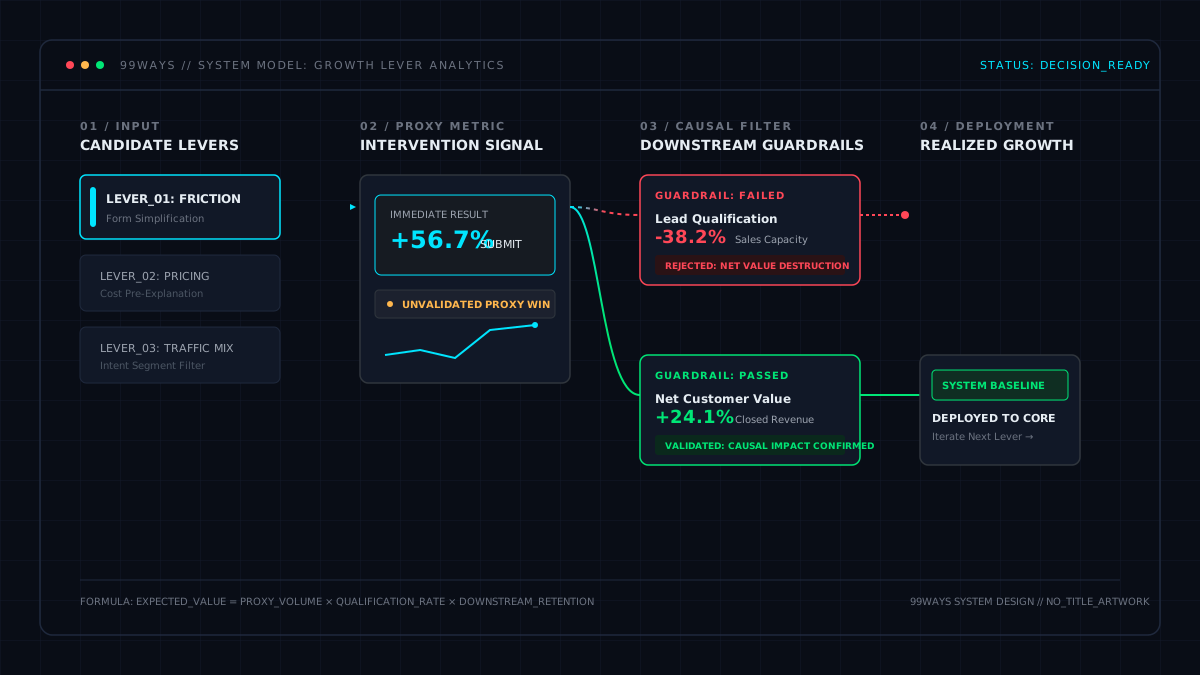
That is why PostHog is a better fit for 99ways’ broader Growth Lever Analytics framework. The objective is not merely to report what happened. It is to identify the lever worth acting on, create the measurement needed to trust the decision, and validate the change.
Three defensible analytics architectures
The right source of truth depends on the operating model.
1. Growth-led business without a dedicated data team
Use:
- the application database, payment processor, ecommerce platform, or CRM as the authoritative business systems;
- PostHog as the behavioral and experimentation source of truth;
- GA4 as the Google acquisition and advertising reporting layer.
This is the architecture 99ways recommends most often for established digital businesses that need deeper answers but do not want to build a full analytics warehouse.
The boundary should be explicit:
- GA4 answers standardized acquisition questions.
- PostHog answers journey, product, funnel, cohort, and experiment questions.
- The business systems settle whether revenue or a customer state actually exists.
- PostHog reports reconcile to those systems.
2. Data-mature business with a warehouse team
Use:
- the warehouse as the canonical analytical source;
- PostHog as the operational product and experimentation interface;
- GA4 as a Google marketing reporting input;
- billing, CRM, product, and advertising data as modeled warehouse sources.
This architecture is stronger when the business needs:
- several attribution models;
- long historical retention;
- finance-grade reconciliation;
- complex account or household identity;
- multiple products or markets;
- custom customer-value models; or
- organization-wide BI.
The trade-off is engineering and governance overhead.
3. Simple marketing site with standard questions
GA4 may be sufficient.
If the business mainly needs page traffic, channel reporting, basic lead events, and Google Ads integration, adding PostHog can create more implementation and governance than the current decisions justify.
PostHog becomes valuable when the team needs to inspect journeys, diagnose a real funnel, follow known users, connect downstream value, or run experiments.
The principle is not “install the more powerful tool.” It is “use the simplest architecture that can answer the important question without hiding the evidence.”
The Growth Source-of-Truth Test
Before designating PostHog, GA4, BigQuery, or a warehouse as the source of truth, run one decision through the complete chain.
Step 1: Choose an authoritative outcome
Select one real purchase, subscription, qualified lead, booked call, renewal, or refund from the system that actually owns the state.
Record the authoritative ID, timestamp, value, currency, and status.
Step 2: Find the corresponding analytics event
Confirm that the analytics event exists and inspect its payload.
Check:
- event name;
- trigger point;
- transaction or object ID;
- value and currency;
- timestamp;
- source environment;
- identity;
- acquisition fields; and
- deduplication key.
Step 3: Reconstruct the identity and journey
Explain how the anonymous visit became the known customer.
Verify that the same logical person is represented across:
- landing;
- signup or form submission;
- product behavior;
- checkout;
- backend outcome; and
- later refund, renewal, or CRM state.
Step 4: Recover the acquisition context
Trace the journey to the most granular acquisition identifier the business needs and can reliably preserve.
This may include:
- source and medium;
- campaign;
- ad set or audience;
- ad or creative;
- keyword;
- click ID; and
- first and latest landing context.
Step 5: Reproduce the aggregate metric
Document the query that calculates the report.
The query must state:
- population;
- event definition;
- identity unit;
- attribution rule;
- conversion window;
- revenue definition;
- exclusions;
- timezone; and
- treatment of refunds, renewals, and duplicates.
Step 6: Reconcile with the system of record
Compare analytics totals with the authoritative system by transaction ID and in aggregate.
Do not demand impossible equality when consent, blockers, offline behavior, or identity loss creates known coverage gaps. Do require the gap to be measured, explained, and stable enough for the decision.
Step 7: State every transformation
Record whether the result uses:
- observed events;
- modeled data;
- Google Signals;
- sampling;
- approximate unique counts;
- privacy thresholding;
(other)grouping;- custom attribution; or
- an external join.
Step 8: Ask one question the original report did not anticipate
For example:
- What happens only on Android?
- What is the result after refunds?
- Which customers activated before purchasing?
- What happens when internal users are excluded?
- Which ad produced the highest qualified-customer rate rather than the highest lead rate?
A source of truth should not collapse when the business question changes slightly.
No platform passes this test in the abstract. It passes for a particular decision, implementation, and period.
Final recommendation
Choose PostHog as the operational source of truth when your growth team needs to:
- inspect event-level evidence;
- understand specific user journeys;
- ask changing business questions;
- connect behavior to downstream value;
- diagnose funnels;
- run and analyze experiments; and
- keep analysis close to the implementation.
Keep GA4 when you need:
- standardized acquisition reporting;
- Google Ads integration;
- Google channel and attribution views;
- consent-related modeling; and
- a common marketing reporting language.
Choose BigQuery or a broader warehouse as the source of truth when the organization needs to reconcile several systems, retain a durable raw history, implement custom identity and attribution, or produce finance-grade analytical models.
PostHog is not better because every GA4 number is wrong. It is better for this role because it makes the evidence behind a growth decision more accessible, inspectable, and adaptable.
GA4 can reach the same raw-data depth through BigQuery. But when that happens, the warehouse – not the GA4 report – is the source of truth.
Frequently asked questions
Is PostHog better than GA4?
PostHog is generally better for product and funnel diagnosis, event-level investigation, person journeys, flexible queries, session replay, feature flags, and experimentation.
GA4 is generally better for standardized acquisition reporting and Google Ads integration. The better product depends on the decision, but PostHog is usually the stronger operational source of truth for growth work.
Can PostHog replace GA4?
PostHog can replace many GA4 behavioral and funnel-analysis use cases.
Most businesses should not remove GA4 automatically. It remains useful for Google acquisition reporting, Google Ads-linked views, and an independent marketing measurement layer. The stronger architecture often gives each platform a defined role.
Does GA4 hide data below 50 users?
There is no official universal 50-user cutoff.
Google states that privacy thresholds are system-defined and does not publish one fixed number. Thresholding depends on the report, dimensions, metrics, reporting identity, and privacy context. A low-volume purchase event is not automatically removed simply because fewer than 50 users converted.
Does GA4 provide raw event-level data?
Yes. GA4 can export raw collected events to BigQuery.
The standard reports may contain processing such as modeling, Google Signals, attribution, approximate unique counts, aggregation, or high-cardinality grouping that is not fully represented in BigQuery. This is why the two surfaces may not reconcile exactly.
Can I inspect individual users in GA4?
GA4’s User Explorer can show pseudonymous user journeys, and BigQuery can query user and event identifiers.
PostHog generally provides a more direct operational workflow for inspecting person activity and moving from an individual journey to an arbitrary event query. Both systems require a correct identity implementation.
Which tool is better for low-volume, high-value conversions?
PostHog is usually easier when every purchase, booked call, or qualified lead needs to be inspected individually and connected to a custom journey.
GA4 can measure low-volume events, and BigQuery provides their raw collected rows. The limitation is not a universal 50-user rule; it is that granular investigation in GA4 often requires leaving the standard reports and building a BigQuery workflow.
Should BigQuery be the source of truth instead?
Yes, when the team actually uses it as the canonical analytical layer.
If BigQuery contains the durable raw export, business-system joins, documented metrics, identity logic, and reconciliation models, it is the source of truth. GA4 then becomes a collection and reporting input.
Can PostHog track marketing attribution?
Yes, when UTMs, referrers, click IDs, identity, revenue events, and attribution rules are implemented deliberately.
PostHog is suitable for source-level and product-led attribution. It is not automatically a specialist multi-touch paid-media attribution platform. Complex call, CRM, email, offline, and cross-network attribution may justify a dedicated system.
Can I use PostHog and GA4 together?
Yes. This is often the best architecture.
Use GA4 for standardized Google acquisition reporting. Use PostHog for behavioral analysis, funnel diagnosis, known-user journeys, experiments, and decision-specific queries. Reconcile both to the same authoritative revenue and customer systems.
The next useful decision
If your team wants PostHog to become a trustworthy decision layer rather than another stream of events, start with implementation quality.
Read PostHog Audit: 12 Checks Before You Trust the Data or see what to expect when hiring a PostHog expert.
The decision is not whether PostHog can collect more data. It is whether your implementation can connect acquisition, identity, behavior, revenue, and experimentation into a result the business can reproduce and trust.